.svg)

December 2025 Product Update
Introducing Client Signals, Zapier automation & more — see what’s new in Zocks!

.avif)
It’s December already, and where did the whole year go? As we close out 2025, we’re feeling incredibly grateful for our Zocks community and excited to share cozy favorites, new drops, and what’s ahead.
Major additions and key updates for December:
- Client Signals - use key life events and business events to trigger workflows
- Zapier automation with Client Signals
- New Meeting Types
- Fully customizable CRM mapping
- Mobile App Updates: Faster Capture, More Control
- Enterprise Level Audit Log
- Analytics Updates: Time-Savings Report
- New Integrations Page
- eMoney course now available in Zocks Academy
Client Signals
Zocks now automatically captures key life and business events, so you can create opportunities and automatically trigger workflows
Identifying and capturing key life and business events for clients including meaningful changes and critical updates can unlock new planning and client engagement opportunities. With this month’s update you can now capture these automatically and trigger workflows effortlessly with Zocks’ conversational intelligence to take your practice to the next level.
These valuable moments are already in your meetings, but tracking and administering those updates across multiple systems is time-consuming. Now they're captured automatically, without manual tagging or forgotten follow-ups.
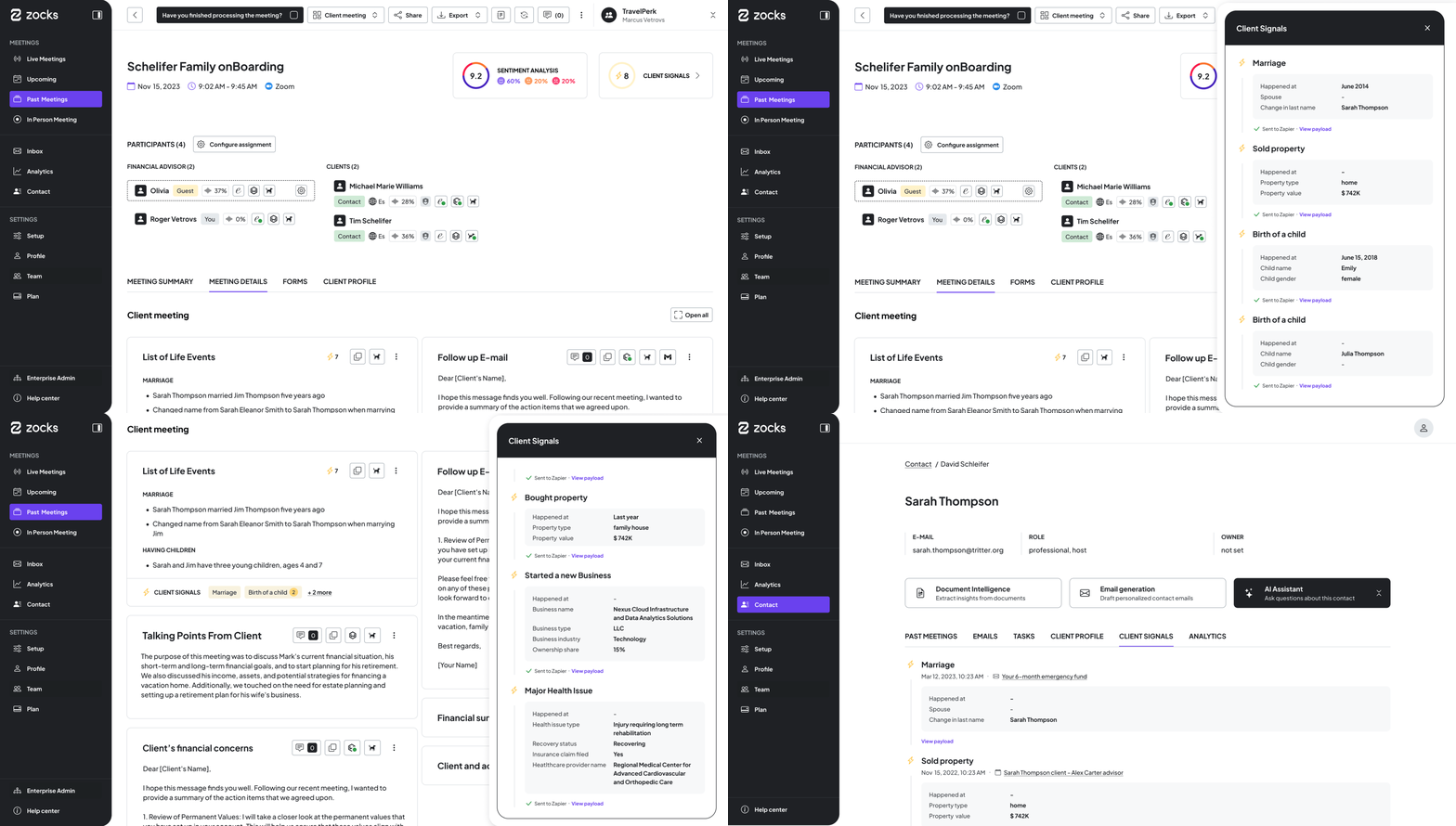
In our first release of Client Signal updates, you’ll gain access to the following event categories:
Lead Management
- Referrals: Automate lead capture and referral follow-up by seamlessly capturing key referral details such as contact information, timing, and referrer. Instantly push this data to your connected systems or use it to trigger intelligent automation workflows.
Life & Business Events
- Marital Change: Events such as Marriage, Divorce, or Widowhood significantly affect a client’s household and serve as an important opportunity to reassess their financial plan.
- Change in Family: The birth of a child is one of the most meaningful moments in a parent’s life. It also represents an important planning milestone creating opportunities to proactively discuss education savings, long-term goals, insurance needs, and future financial priorities.
- Property Ownership Change: Buying or selling property is a major financial milestone that impacts cash flow, debt, and long-term goals, prompting a timely review of the client’s financial plan.
- Career Change: A job change, whether a promotion or a move to a new company, can significantly affect income, benefits, and long-term goals, making it an ideal moment to revisit and adjust the client’s financial plan.
- Retirement & Life Transitions: Pension or 401k, retirement income, employer at retirement and all related details are captured.
- Inheritance & Wealth Change: An inheritance or sudden change in wealth can materially impact a client’s financial picture, creating the need to reassess goals, tax considerations, and long-term planning.
- Business Change: Starting a new business or experiencing a major expansion affects income and risk, while also creating important planning opportunities around succession and exit strategy.
- Health Updates: Changes in health can influence expenses and long-term planning, signaling the need for timely financial adjustments.
- Education Change: Starting college is a major milestone that impacts cash flow and savings, creating an opportunity to review education funding and broader financial priorities.
Decisions
- Decision Made: Capture clear decisions reached during client conversations, including a concise description of the decision, who is responsible for acting (clients and/or advisors), ensuring alignment, accountability, and accurate follow-through.
Future Events
- Future Meeting: Automatically record scheduled or agreed-upon future meetings, including the meeting title, so follow-ups, preparation workflows, and booking or reminders can be triggered without manual tracking.
Zocks Client Signals are built on our proven AI Presets that transform client conversations into structured data. Now expanded to include trigger events and actionable details, this output is designed for seamless processing by connected systems and enabling automated workflows or intelligent evaluations. Zocks’ Client Signals ensure every opportunity is captured, all updates are properly administered, and regulatory requirements are met.
Availability: Available to Professional and Ultimate users. Events are created automatically through Presets, and we’re progressively rolling out full event visibility across the UI.
Build Client Signal-based automations in Zapier
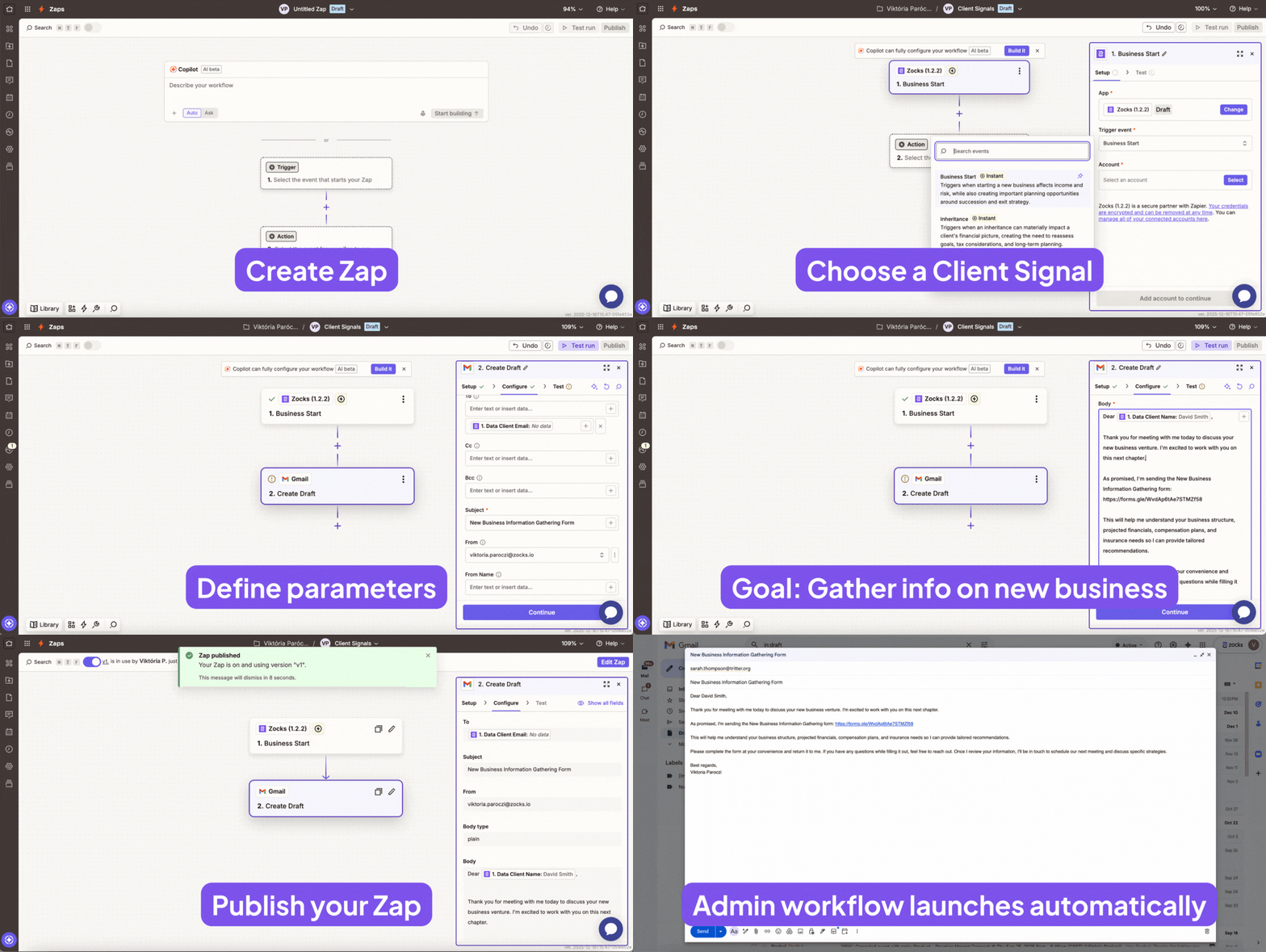
Zocks Client Signals seamlessly flow to downstream systems through our Zapier integration, enabling powerful, end-to-end workflows that were previously complex or impossible to implement. What makes Zocks Client Signals unique is how they’re captured from virtual meetings, in-person conversations, or phone calls while being delivered in a format designed for software to consume, with standardized details such as timestamps, names, event types, and account information.
Whether you’re automating updated contract preparation in Docusign, triggering retirement gifts through Sendoso, jumpstarting workflows like succession planning, or ensuring marital changes are accurately reflected across household records, Zaps can be built to make your practice run like a well-oiled machine.
Availability: Zapier integration is only available to our customers in the Ultimate subscription tier.
New Meeting Types
We have reshaped Zocks’ fully customizable meeting architecture to give advisors clearer, more intentional control over how their workflows are structured through Meeting Types. Each Meeting Type defines the level of detail, formatting, required information, key financial details, and other parameters that shape both meeting summaries and the structured data extracted from them.
As part of this reshaping, we aligned the system more closely with industry-specific workflows such as lead-to-client conversions, reviews, check-ins, and insurance-focused processes. This includes an updated set of system default Meeting Types:
- Internal Meeting
- General Client Check-In (new account default)
- Plan Proposal
- Client Review
- Client Intake
- Discovery Meeting
- Insurance Discovery Meeting
These Meeting Types not only include a fine-tuned Meeting Summary template but also a tailored collection of Presets, and a Meeting Prep template to complete the package and support each step of the meeting process.
Fully Customizable, Self-Service CRM Mapping
Zocks has long supported custom data mapping for CRMs, and we're now making it easier and more flexible than ever. With today"s release, we're introducing enhanced self-service capabilities that allow you to configure and adjust CRM data mappings with greater independence - while still having the support of our Implementation Team when you need it. Working alongside your Implementation Manager, you can now map data from Zocks to specific objects and fields in your Salesforce and Microsoft Dynamics exactly how you need them and build workflows that match how your practice operates. This gives you more granular control and faster iteration during your CRM setup, with expert guidance to ensure everything is configured optimally for your unique requirements.
- Account Owners and Admins can now configure custom CRM mappings
- Select your preferred contact, note, and task objects in your CRM
- Define field-level mapping for contact information when syncing updates from Zocks to your CRM
- Control exactly what data Zocks pulls for Meeting Prep and other features
- Define field-level mapping for contact information when syncing updates from Zocks to your CRM
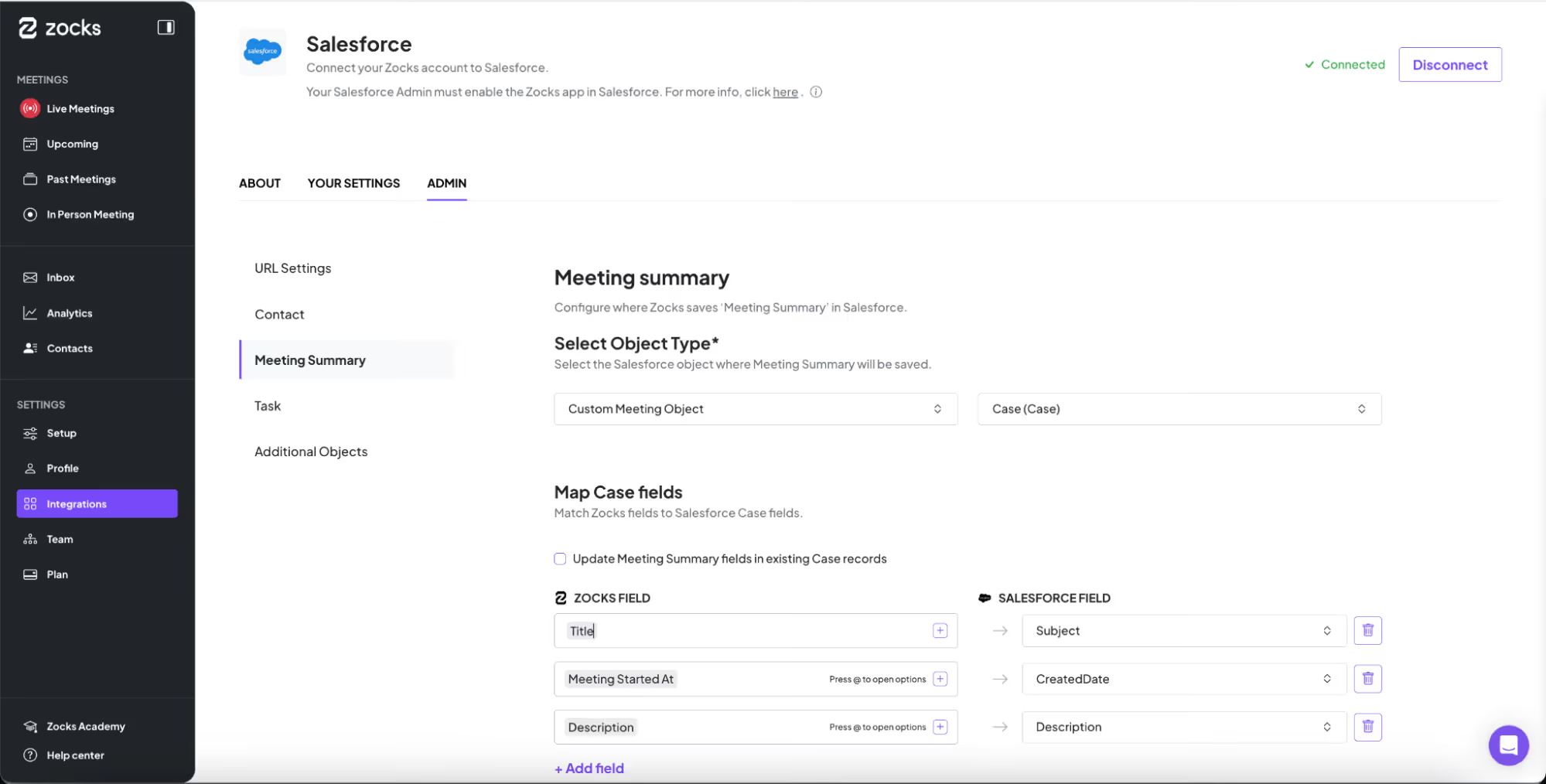
This capability is currently available for Salesforce and Microsoft Dynamics.
Please note: This feature requires strong familiarity with your CRM implementation - especially any custom objects. For assistance, please contact your Implementation Manager or the Zocks Support Team.
Availability: Customizable mapping is available to our customers in the Professional and Ultimate subscription tiers.
Mobile App Updates: Faster Capture, More Control
We’ve enhanced the mobile experience to make note capture faster and give you more control over how meetings are processed-without switching devices.
Quick-access Dictation
A new one-tap dictation button is now available on the home screen. Starting a dictation session (supports up to three minutes) automatically applies the Dictation meeting type by matching its name. If Dictation is deactivated and no active meeting type contains this name fragment, the system falls back to the account’s default meeting type, and for longer than 3-minute meetings.
Change Meeting Type on Mobile
Meeting types can now be updated directly on mobile. Users can change the meeting type for any upcoming meeting from the meeting details view, or during a live meeting directly from the live screen.
These updates are designed to streamline mobile workflows, improve speed of capture, and provide consistent control across devices.
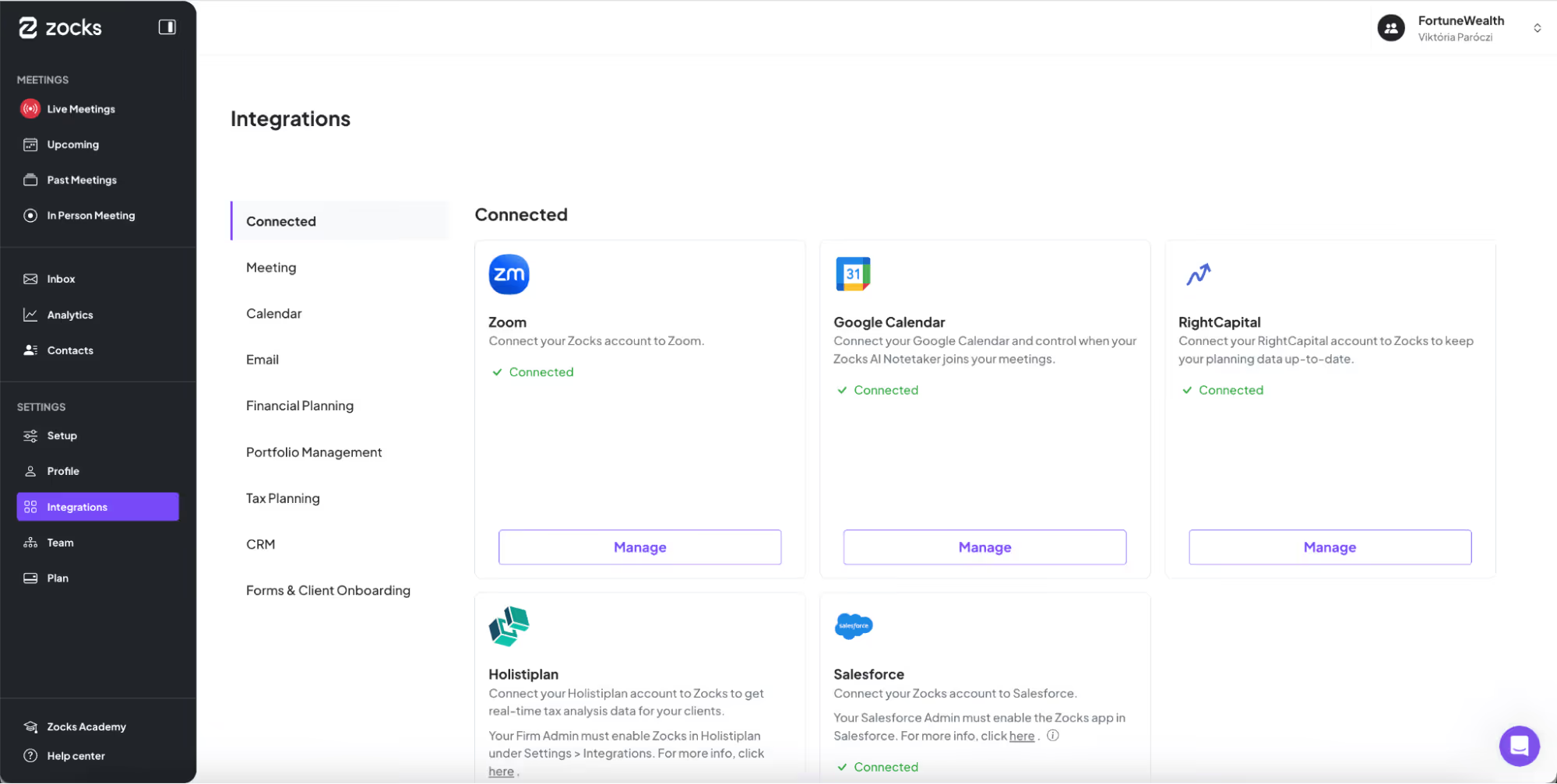
New Integrations Page
Integrations are getting a major upgrade today with a dedicated menu item in your left menu bar. The redesigned experience gives you complete visibility into your connected tech stack and all available integrations - with full capability details displayed directly, so you can see exactly what each integration does without digging through help articles in Zocks’ Help Center.
Key improvements:
- Centralized control: All integrations in one location for easy management
- Smart organization: Systems grouped by type (CRM, financial planning, portfolio management) so you can quickly find what you need
- Instant capability visibility: See what each integration can do right there, all at a glance
Analytics Updates: Time-Savings Report
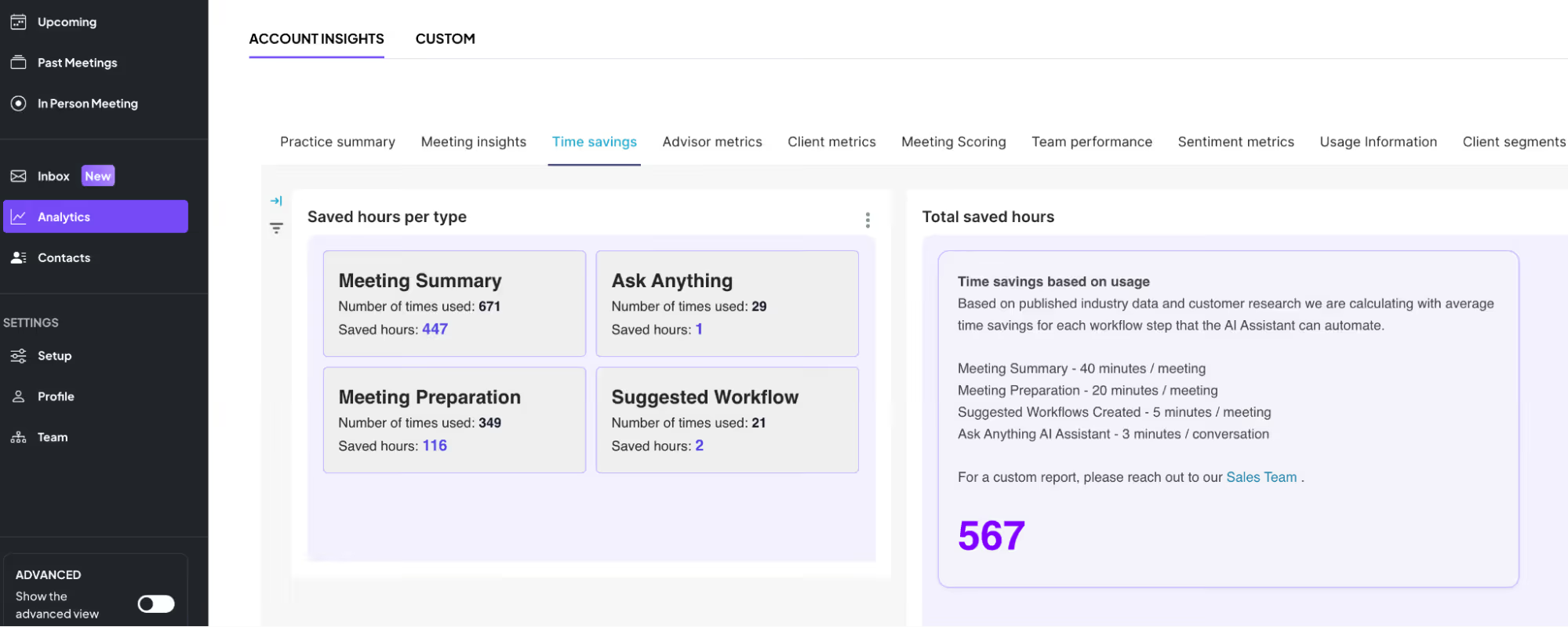
Improved time-savings analytics with clearer insights and wider availability.
This update helps teams understand the ROI of using Zocks by clearly showing how much time is being saved across the account. It’s especially useful for admins as they can measure impact & the value of using Zocks. Updates include:
- A new view that highlights time savings by Meeting Summaries, Meeting Prep, Ask Anything and suggested Workflows, making insights more visible
- This was previously an enterprise-only report; which is now available to all account levels
- All Admins and Owners can track time savings as it is now available for all tiers
Self-Serve Audit Log
Introducing a detailed fully self-serve audit log that helps enterprise teams track key user actions for compliance.
This new feature will be especially valuable for large organizations that need visibility and transparency into user activity for security and compliance requirements. It also gives Zocks Administrators control by making user actions transparent and auditable.
Details:
- Available for Pro and Enterprise customers
- Gradual rollout over the coming weeks
- Initial release includes tracking for a core set of user actions
- Coverage will expand early next year with more events
- Admins can view audit activity in a dedicated dashboard
- Data-retention timeframe can be adjusted in Settings (default is 7 days)
- Audit logging can be disabled if needed
Zocks Client Signals are built on our proven AI Presets that transform client conversations into structured data. Now expanded to include trigger events and actionable details, this output is designed for seamless processing by connected systems and enabling automated workflows or intelligent evaluations. Zocks’ Client Signals ensure every opportunity is captured, all updates are properly administered, and regulatory requirements are met.
Availability: Available to Professional and Ultimate users. Events are created automatically through Presets, and we’re progressively rolling out full event visibility across the UI.
Build Client Signal-based automations in Zapier
Zocks Client Signals seamlessly flow to downstream systems through our Zapier integration, enabling powerful, end-to-end workflows that were previously complex or impossible to implement. What makes Zocks Client Signals unique is how they’re captured from virtual meetings, in-person conversations, or phone calls while being delivered in a format designed for software to consume, with standardized details such as timestamps, names, event types, and account information.
Whether you’re automating updated contract preparation in Docusign, triggering retirement gifts through Sendoso, jumpstarting workflows like succession planning, or ensuring marital changes are accurately reflected across household records, Zaps can be built to make your practice run like a well-oiled machine.
Availability: Zapier integration is only available to our customers in the Ultimate subscription tier.
New Meeting Types
We have reshaped Zocks’ fully customizable meeting architecture to give advisors clearer, more intentional control over how their workflows are structured through Meeting Types. Each Meeting Type defines level of detail, formatting, required information, key financial details, and other parameters that shape both meeting notes and the structured data extracted from them.
As part of this reshaping, we aligned the system more closely with industry-specific workflows such as lead-to-client conversions, reviews, check-ins, and insurance-focused processes, including an updated set of system default Meeting Types:
- Internal Meeting
- General Client Check-In (new account default)
- Plan Proposal
- Client Review
- Client Intake
- Discovery Meeting
- Insurance Discovery Meeting
These Meeting Types not only include a fine-tuned Meeting Summary template but also a tailored collection of Presets, and a Meeting Prep template to complete the package and support each step of the meeting process.
Please note: These new templates are being rolled out gradually. They are currently available for new accounts. Existing accounts will gain access through rollout and migration features in early 2026. If you would like to use the new templates sooner, please contact our support team.
Fully Customizable, Self-Service CRM Mapping
Zocks has long supported custom data mapping for CRMs, and we're now making it easier and more flexible than ever. With this release, we're introducing enhanced self-service capabilities that allow you to configure and adjust CRM data mappings with greater independence - while still having the support of our Implementation Team when you need it. Working alongside your Implementation Manager, you can now map data from Zocks to specific objects and fields in your Salesforce and Microsoft Dynamics exactly how you need them and build workflows that match how your practice operates. This gives you more granular control and faster iteration during your CRM setup, with expert guidance to ensure everything is configured optimally for your unique requirements.
- Account Owners and Admins can now configure custom CRM mappings
- Select your preferred contact, note, and task objects in your CRM
- Define field-level mapping for contact information when syncing updates from Zocks to your CRM
- Control exactly what data Zocks pulls for Meeting Prep and other features
- Define field-level mapping for contact information when syncing updates from Zocks to your CRM
This capability is currently available for Salesforce and Microsoft Dynamics.
Please note: This feature requires strong familiarity with your CRM implementation - especially any custom objects. For assistance, please contact your Implementation Manager or the Zocks Support Team.
Availability: Customizable mapping is available to our customers in the Professional and Ultimate subscription tiers.
Mobile App Updates: Faster Capture, More Control
We’ve enhanced the mobile experience to make note capture faster and give you more control over how meetings are processed-without switching devices.
Quick-access Dictation
A new one-tap dictation button is now available on the home screen. Starting a dictation session (supports up to three minutes) automatically applies the Dictation meeting type by matching its name. If Dictation is deactivated and no active meeting type contains this name fragment, the system falls back to the account’s default meeting type, and for longer than 3-minute meetings.
Change Meeting Type on Mobile
Meeting types can now be updated directly on mobile. Users can change the meeting type for any upcoming meeting from the meeting details view, or during a live meeting directly from the live screen.
These updates are designed to streamline mobile workflows, improve speed of capture, and provide consistent control across devices.
New Integrations Page
Integrations are getting a major upgrade today with a dedicated menu item in your left menu bar. The redesigned experience gives you complete visibility into your connected tech stack and all available integrations - with full capability details displayed directly, so you can see exactly what each integration does without digging through help articles in Zocks’ Help Center.
Key improvements:
- Centralized control: All integrations in one location for easy management
- Smart organization: Systems grouped by type (CRM, financial planning, portfolio management) so you can quickly find what you need
- Instant capability visibility: See what each integration can do right there, all at a glance
Analytics Updates: Time-Savings Report
Improved time-savings analytics with clearer insights and wider availability.
This update helps teams understand the ROI of using Zocks by clearly showing how much time is being saved across the account. It’s especially useful for admins as they can measure impact & the value of using Zocks. Updates include:
- A new view that highlights time savings by Meeting Summaries, Meeting Prep, Ask Anything and suggested Workflows, making insights more visible
- This was previously an enterprise-only report; which is now available to all account levels
- All Admins and Owners can track time savings as it is now available for all tiers
Self-Serve Audit Log
Introducing a detailed fully self-serve audit log that helps enterprise teams track key user actions for compliance.
This new feature will be especially valuable for large organizations that need visibility and transparency into user activity for security and compliance requirements. It also gives Zocks Administrators control by making user actions transparent and auditable.
Details:
- Available for Pro and Enterprise customers
- Gradual rollout over the coming weeks
- Initial release includes tracking for a core set of user actions
- Coverage will expand early next year with more events
- Admins can view audit activity in a dedicated dashboard
- Data-retention timeframe can be adjusted in Settings (default is 7 days)
- Audit logging can be disabled if needed
Related blogs
.avif)
Get started for free in less than 10 minutes