.svg)

January 2026 Product Update
AI document fill, multi-language support, Wealth.com integration & more — see what’s new in Zocks!

2026 is off to a fast start. We closed a $45M Series B, and we're putting it to work. Here's what's new in January.
Major additions and key updates for January:
- AI Document Fill – Auto-fill your firm's PDF templates in one click
- Zoom Meeting Capture – Important changes taking effect March 2
- Meeting Workflow Updates -Template Library, Multi-Language Support, Meeting Prep Email Notifications, Mobile Past Meetings
- Integration Updates - Wealth.com Estate Planning (NEW), AdvisorEngine Enhancements, Redesigned Contact Data Management, Integration Insights for Admins
- Client Signals – Detected life events now visible in a contact timeline
One more thing: The 2026 T3 Software Survey is officially open. If you have a moment to share how you're using technology at your firm, it helps us ensure Zocks evolves to meet your needs.
AI Document Fill
You can now upload your existing PDF templates and let Zocks fill them out for you.
Most advisory firms rely on compliance-approved intake forms, data sheets, and questionnaires that are tightly aligned with firm processes and regulatory requirements. With AI Document Fill, Zocks works directly with those existing documents; no redesigns, workflow changes, or re-approvals are required.
Once mapped as reusable templates, Zocks automatically populates your standard PDF forms with client and meeting data in a single click. The layout, formatting, and branding stay exactly the same, Zocks simply removes the manual data entry.
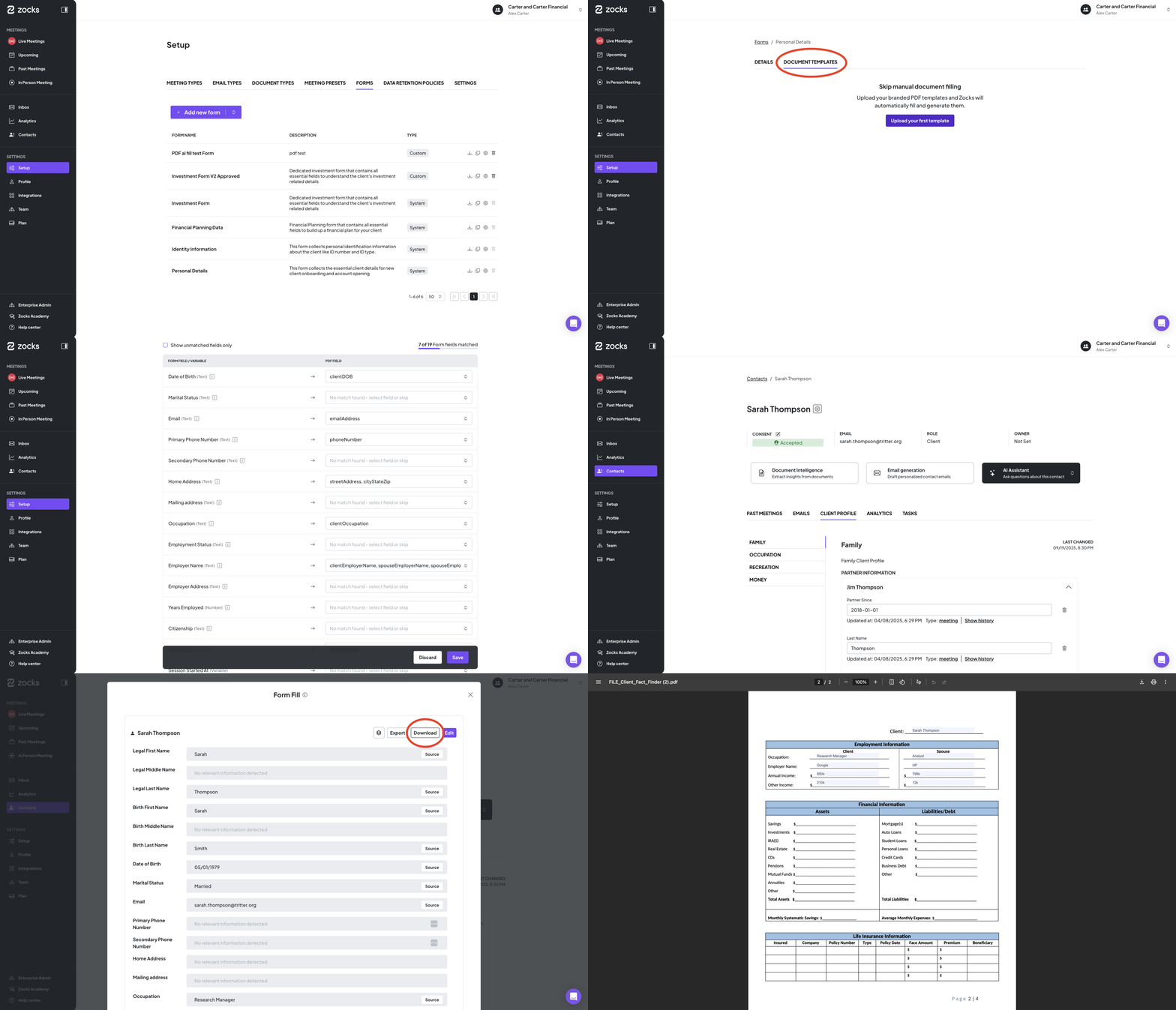
To learn more, visit the Zocks Help Center.
Availability: Available to Ultimate customers.
If you need any help with preparing or importing your firm’s PDF files to Zocks, please contact us as our team is happy to help with the process.
Important: Zoom Meeting Capture is Changing
Starting March 2, 2026, Zoom is implementing a platform-wide change that impacts how Zocks AI assistants join and capture meetings.
To comply with Zoom’s new security and transparency requirements, explicit user-level authorization is now mandatory; calendar access alone will no longer be sufficient for Zocks AI assistants to join a meeting. Additionally, capture is now tied directly to the connected Zoom user. This means Zocks will no longer be able to join meetings on its own, join before the user, or remain in the meeting after the user leaves.
What you need to do:
- If Zoom is already connected: No action needed. Zocks will continue capturing your meetings.
- If Zoom is not connected: You must enable the Zoom integration in Zocks settings before March 2 to continue capturing meetings.
Note: Zocks will no longer be able to join before you or remain after you leave. These are Zoom's new requirements, not ours.
To learn more about the change and what to expect, visit this article. If you have any questions, please contact the Zocks support team.
Multi-Language Support
Enhance the client experience and expand your reach with multilingual meeting intelligence.
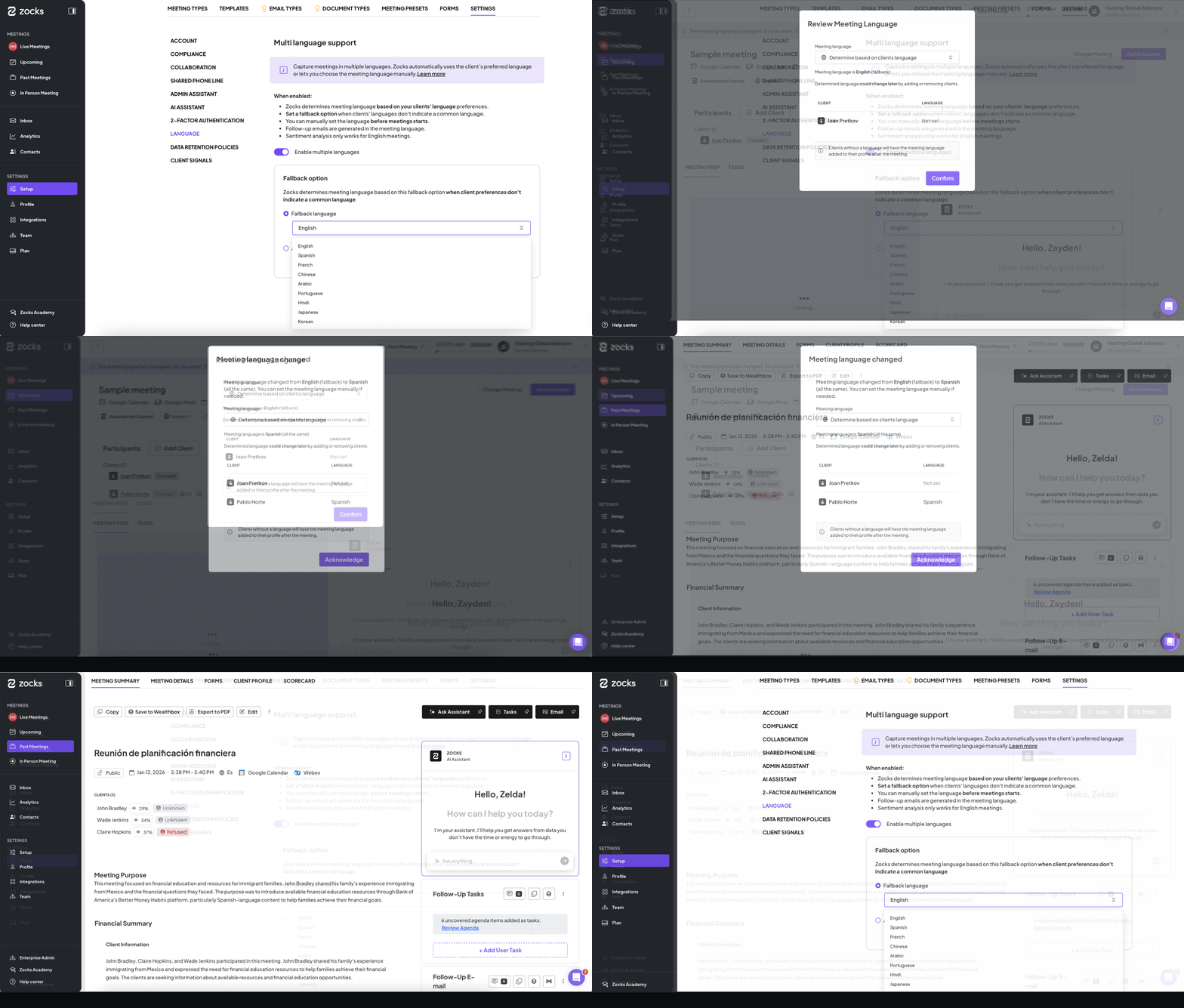
Multi-Language Support expands Zocks’ meeting capabilities beyond English, enabling advisors to confidently capture and summarize meetings in their clients’ preferred languages. The following languages are supported: Dutch, French, German, Hindi, Italian, Japanese, Portuguese, Russian, and Spanish.
To protect meeting value and data quality, the system automatically determines the meeting language based on your settings. To prevent configuration errors, Zocks includes manual overrides, live meeting adjustments, and an optional auto-detect fallback that analyzes the first 90 seconds of speech. Clear guidance and warnings help ensure the correct language is selected before processing beings, preventing permanent impact on transcript accuracy.
Language preferences can be managed at both the contact and meeting level, and follow-up emails are automatically generated in the designated meeting language.
Availability: Available to Professional and Ultimate customers.
Template Library
Standardize meeting documentation across your firm to ensure consistency and save time.
The Template Library is a centralized hub that makes it easier than ever to manage your meeting documentation in one place: meeting summaries, meeting prep, follow-up email presets, reply emails, and more. Seamlessly view, edit, duplicate, and delete templates as needed.
To help your teams get started quickly, we’ve included a collection of high-quality templates that serve as a strong default foundation. These are fully customizable to fit your practice's unique needs.
Additionally, template admins and owners can set or override team defaults directly from the template hub. This gives your firm greater control and ensures that every advisor delivers a consistent, professional output for every client interaction.
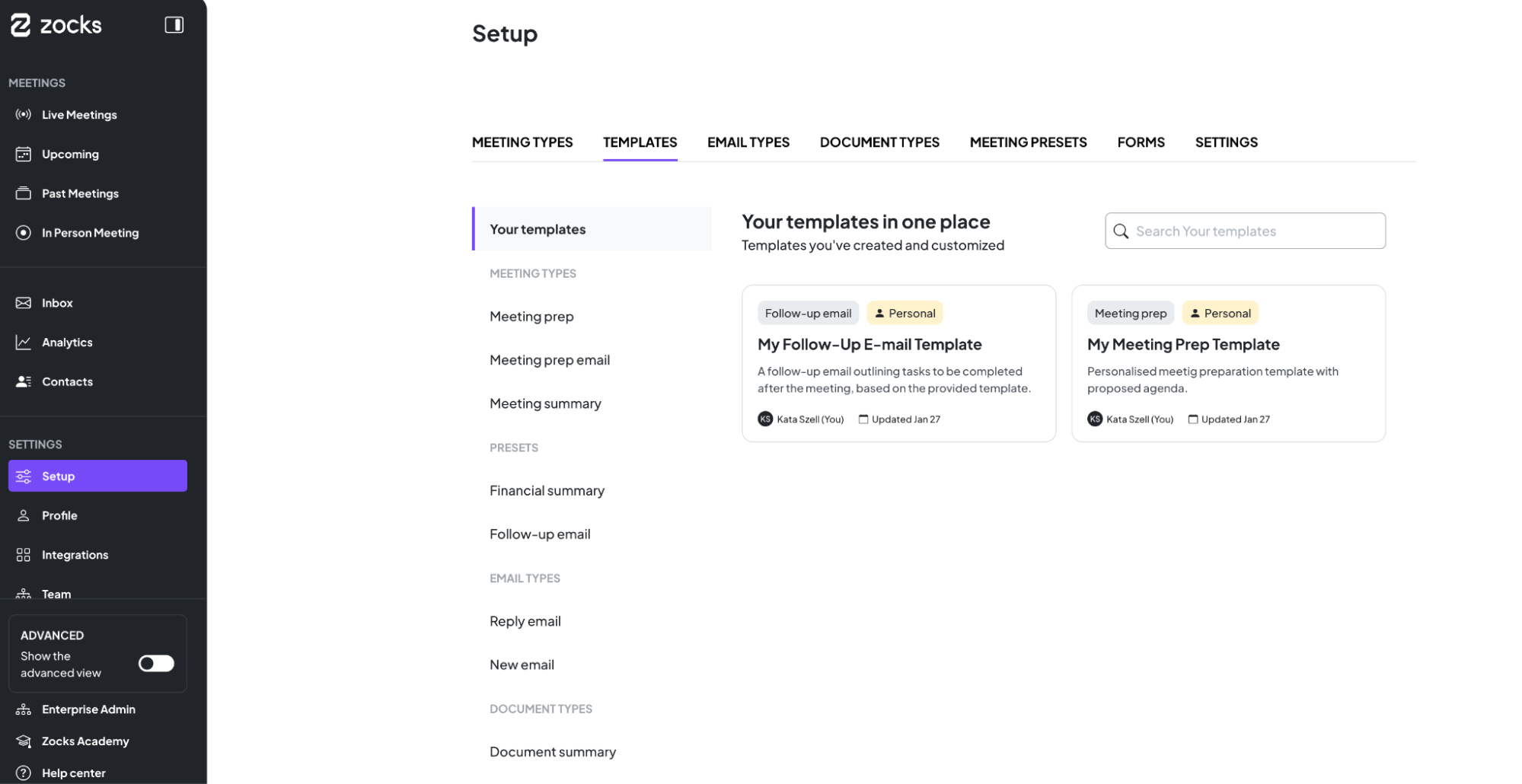
To learn more, visit the Zocks Help Center.
Availability: Available to all customers.
New Integration: Wealth.com Estate Planning
Move estate plans forward faster than ever.
With the Zocks × Wealth.com integration, advisors can prepare for estate planning meetings with full context in Zocks.
What you can do:
- Prepare better for meetings: See estate planning status from Wealth.com in Zocks Meeting Prep, including quiz completion, document progress, existing documents, and recommended next steps
- Get instant answers with Ask Anything: Ask questions about a client’s estate planning status or progress and get answers powered by Wealth.com data
- Use estate planning data across workflows: Leverage Wealth.com information in Zocks Forms and other workflows to reduce duplicate work
- Draft intelligent email replies: Generate client email replies using real estate planning context from Wealth.com. (Available exclusively in the Ultimate plan.)
Register for our webinar on for a live demo of the Wealth.com integration.
AdvisorEngine Integration Enhancements
We've expanded our AdvisorEngine integration so you can work faster with all your client information in one place.
New capabilities include:
- Meeting prep powered by AdvisorEngine: See structured meeting history, client details, and outstanding follow-ups inside Zocks before every meeting.
- Instant insights from AdvisorEngine: Get quick answers about client notes, tasks, and CRM records using the Ask Anything AI Assistant — across contact pages, meeting prep, live meetings, and summaries.
- Email replies informed by AdvisorEngine context: Auto-generate client emails that reference recent conversations, follow-ups, and CRM context.
- Automatic Form filling: Fill forms with client data pulled from past meetings, emails, calendars, financial planning, and now AdvisorEngine.
Register for our webinar to see all of the new AdvisorEngine integration capabilities.
Redesigned Contact Data Management
Manage complex client data with ease as your practice scales.
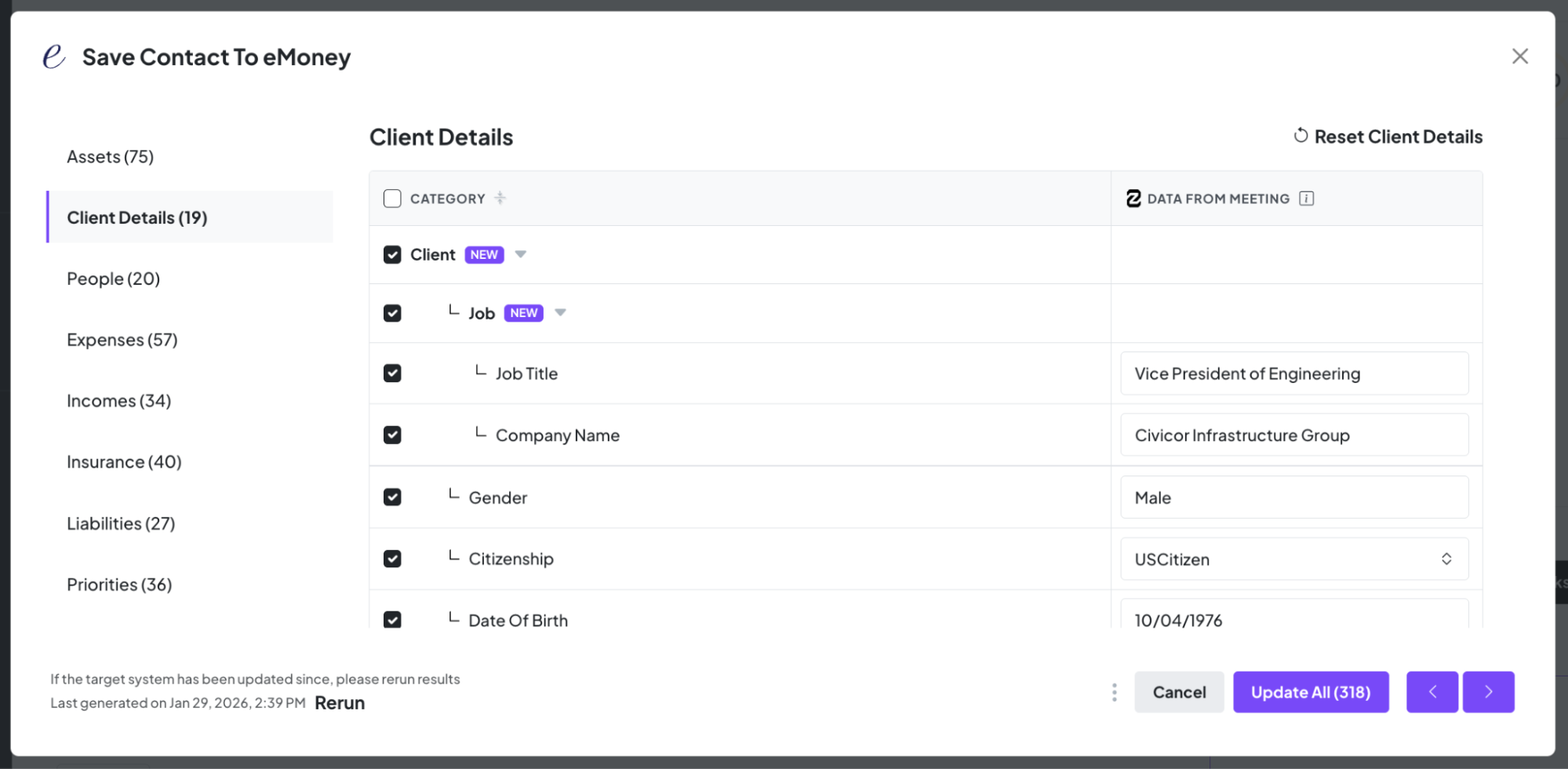
As Zocks identifies and captures hundreds of unique data fields from your client meetings, emails, and documents, our redesigned contact interface ensures this data remains organized and actionable. The new look delivers:
- Clear visualization: Effortlessly see and manage hundreds of client data fields in a clean, intuitive layout.
- Complete visibility: Track exactly which fields are being updated across your tech stack to ensure data integrity and compliance.
This redesign ensures you can manage complex household profiles efficiently, turning raw information into a scalable asset for your firm.
Client Signals - Contact Timeline
Zocks’ Client Signals detect key life and business events as they come up naturally in client conversations, turning important updates into opportunities and automatic workflow triggers.
Instead of manually tracking client changes and opportunities across systems, Zocks captures these signals in real time, ensuring critical updates are never missed and can immediately drive follow-ups, planning, and downstream actions across your practice.
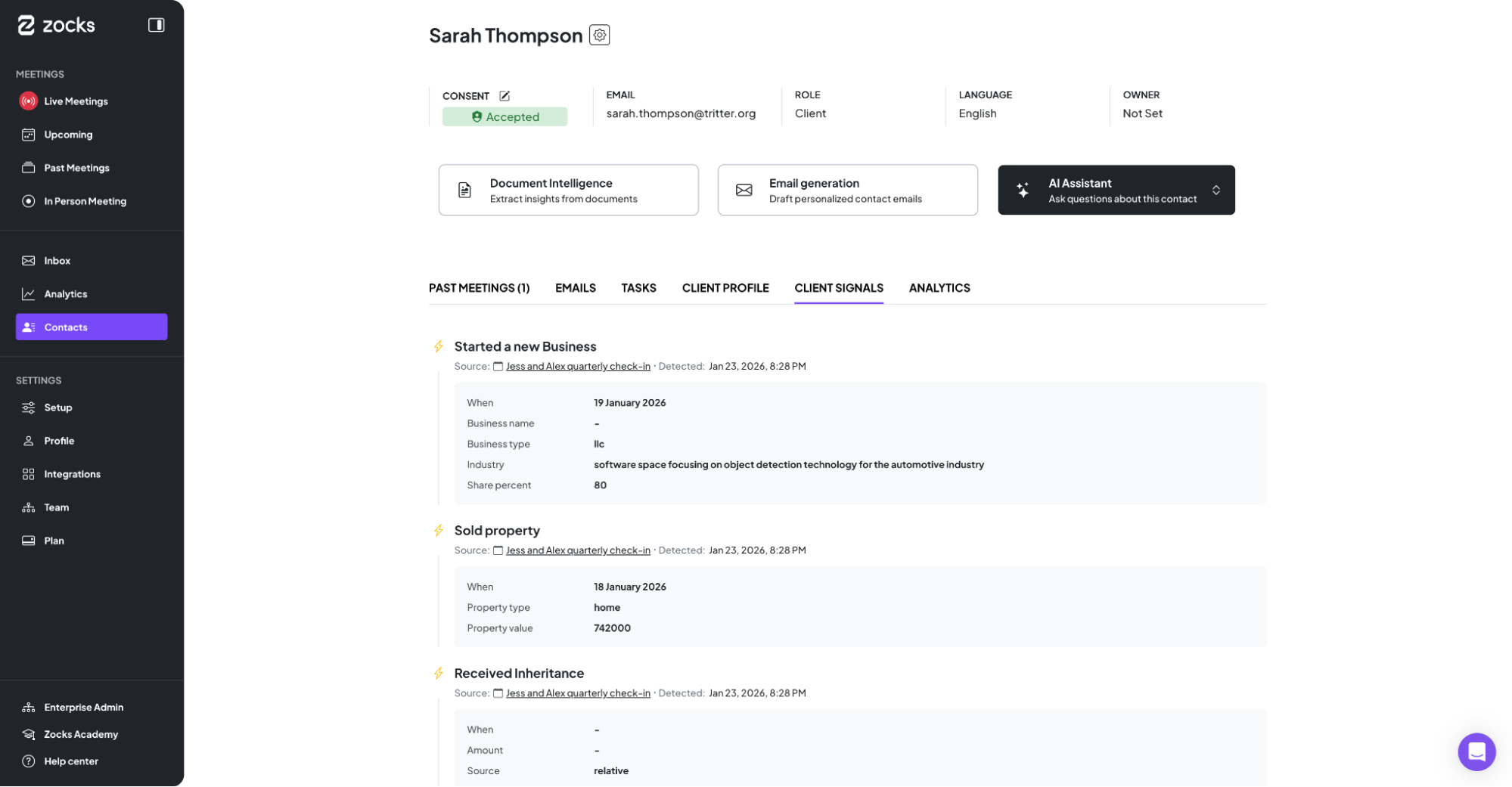
All detected Client Signals are now visible as a timeline on your meetings and within each client record.
Client Signals combined with our Zapier integration, provide endless automation possibilities for your internal workflows. Just to mention a few:
- Property inheritance: Automatically generate a DocuSign packet, create an Asana task for document review, and notify the operations team in Slack
- New child or grandchild: Trigger a beneficiary update workflow, generate required forms, and queue personalized follow-up text messages via your marketing platform or Twilio integration
- Retirement: Automatically trigger a handwritten card or a congratulatory gift and send it through Sendoso
- Marriage: Trigger a workflow that prompts the advisor to record a personalized video message via Loom or BombBomb and notifies the client automatically once sent
If you have an internal workflow you’d like to automate, reach out to our team and we’ll help you set it up.
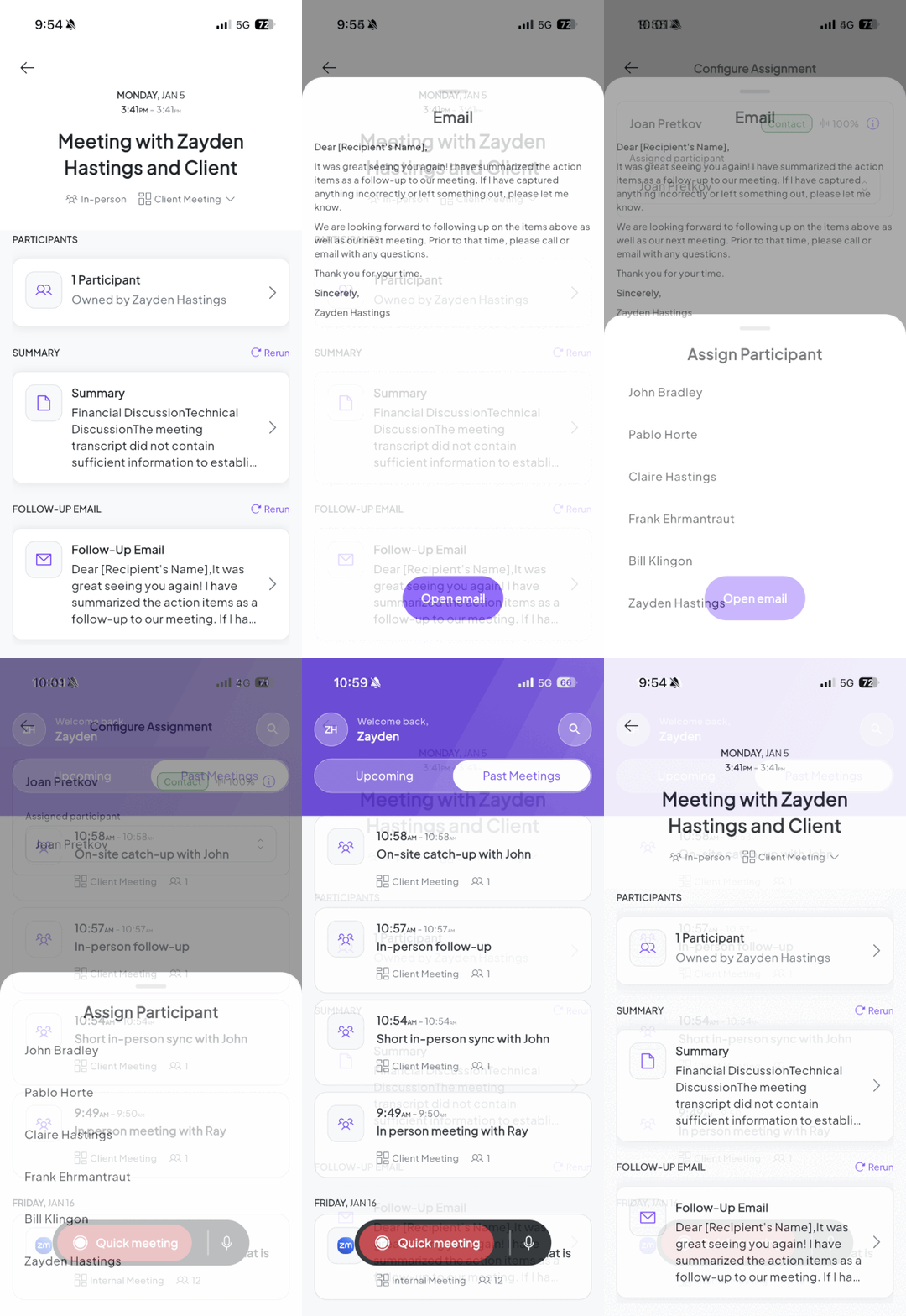
Mobile App Update: Enhanced Past Meeting Intelligence
Stay present with your clients and productive on the go with full access to your meeting insights from anywhere.
The Zocks mobile app now offers a much richer way to review completed meetings directly for your device. Rather than a simple list, you can now access comprehensive, mobile-optimized details including summaries, meeting type, participant management, and follow-up emails. This update allows you to:
- Review Mobile-Friendly Summaries: Instantly access key takeaways from recent meetings
- Manage Participants: Add and remove meeting attendees directly after the conversation.
- Send Follow-Ups Instantly: Generate and send professionally drafted client emails using your device’s default mail app.
Continue your work with one tap, switching to the full web experience for deeper review.
Availability: Past Meetings for Mobile App is rolling out progressively to all users. Please ensure you have the latest version of the Zocks app downloaded from the Apple Store or Google Pay to access these features.
Meeting Prep Email Notifications
With Meeting Prep Email Notifications, Zocks now delivers comprehensive meeting briefs directly to your inbox.
Once you configure your notification preferences, Zocks automatically sends meeting prep summaries to the right team members at the right time. Each email includes the full meeting prep content, plus a direct link to access everything in Zocks.
Meeting Prep Email Notifications build on Zocks' automatic meeting prep generation, giving you the flexibility to notify meeting owners and selected team members the second your Meeting Prep is ready.
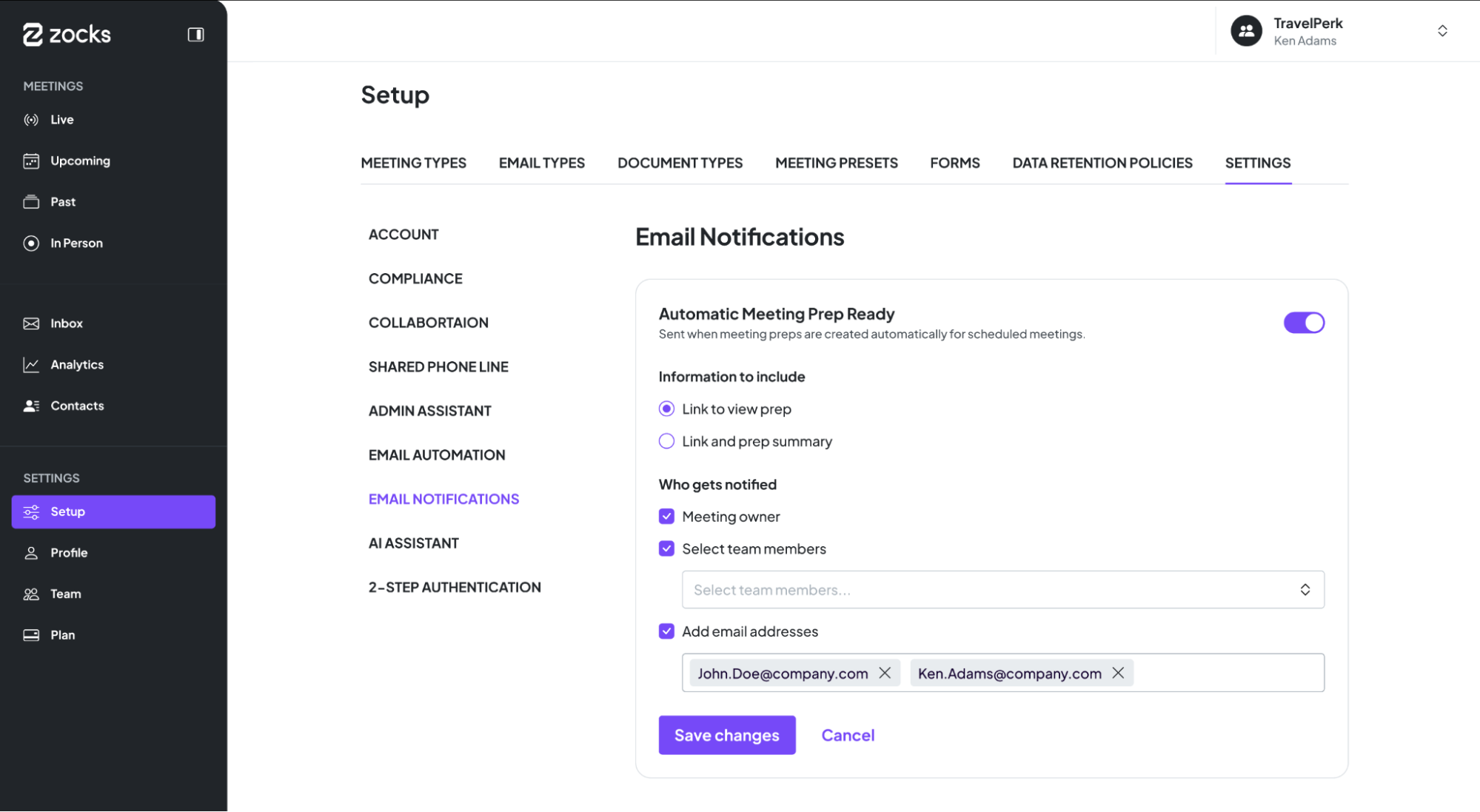
Availability: Meeting Prep Notification settings are rolling out progressively and are available for Professional and Ultimate customers.
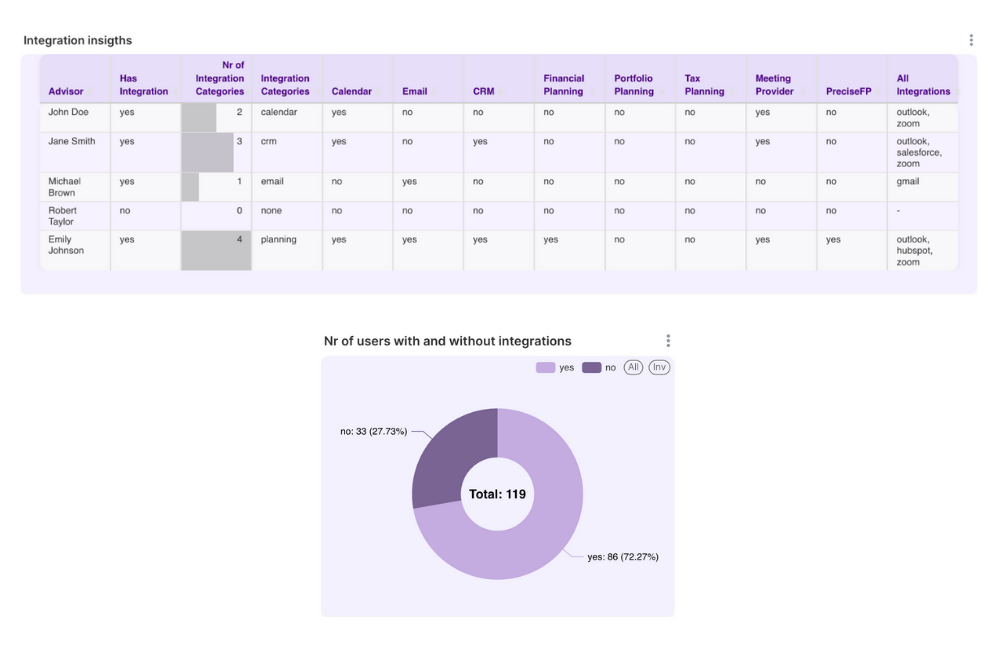
Integration Insights
See integration usage at a glance.
Integration Insights is now available across account and enterprise dashboards. Enterprise admins can now use the new search bar to quickly filter for specific sub-accounts and view only the most relevant rows.
These enhancements make it easier to monitor advisor’s integration counts and usage statistics, providing clearer visibility and more efficient account management.
Related blogs
.avif)
Get started for free in less than 10 minutes