.svg)

August 2026 Product Update
Schwab Account Opening, New Scheduling Capabilities & more - see what's new in Zocks!

We're back with the August product update. We're bringing Schwab account opening into Zocks, to launch an opening with the envelope already pre-filled. Scheduling now handles automated reminders, consent collection on booking pages, and canceled booking tracking, and Document Intelligence now surfaces recent client files right in Meeting Prep. You can also update any CRM record from a meeting — not just contacts — plus there's a new Zoom Phone integration and per-user time savings reporting.
Major additions and key updates for August:
- Schwab Account Opening
- Scheduling: Proactive Automated Reminders, Consent collection on Booking Pages & Canceled Booking Tracking
- Document Intelligence: Processed Documents in Meeting Prep & Attachment surfacing on the Documents page
- Update Any CRM Record from a Meeting
- Zoom Phone Integration
- Detailed Time Saving Report
Schwab Account Opening
Start a Schwab account opening directly from Zocks.
Account opening is where a good meeting turns into hours of re-keying — and the longer it takes, the more likely money in motion goes still.
Launch an opening from Zocks and the envelope arrives pre-filled from the Client Profile, your connected systems, and the conversation itself. Zocks validates it against Schwab's rules before handoff, then you go straight to Schwab Advisor Center to send for e-authorization.
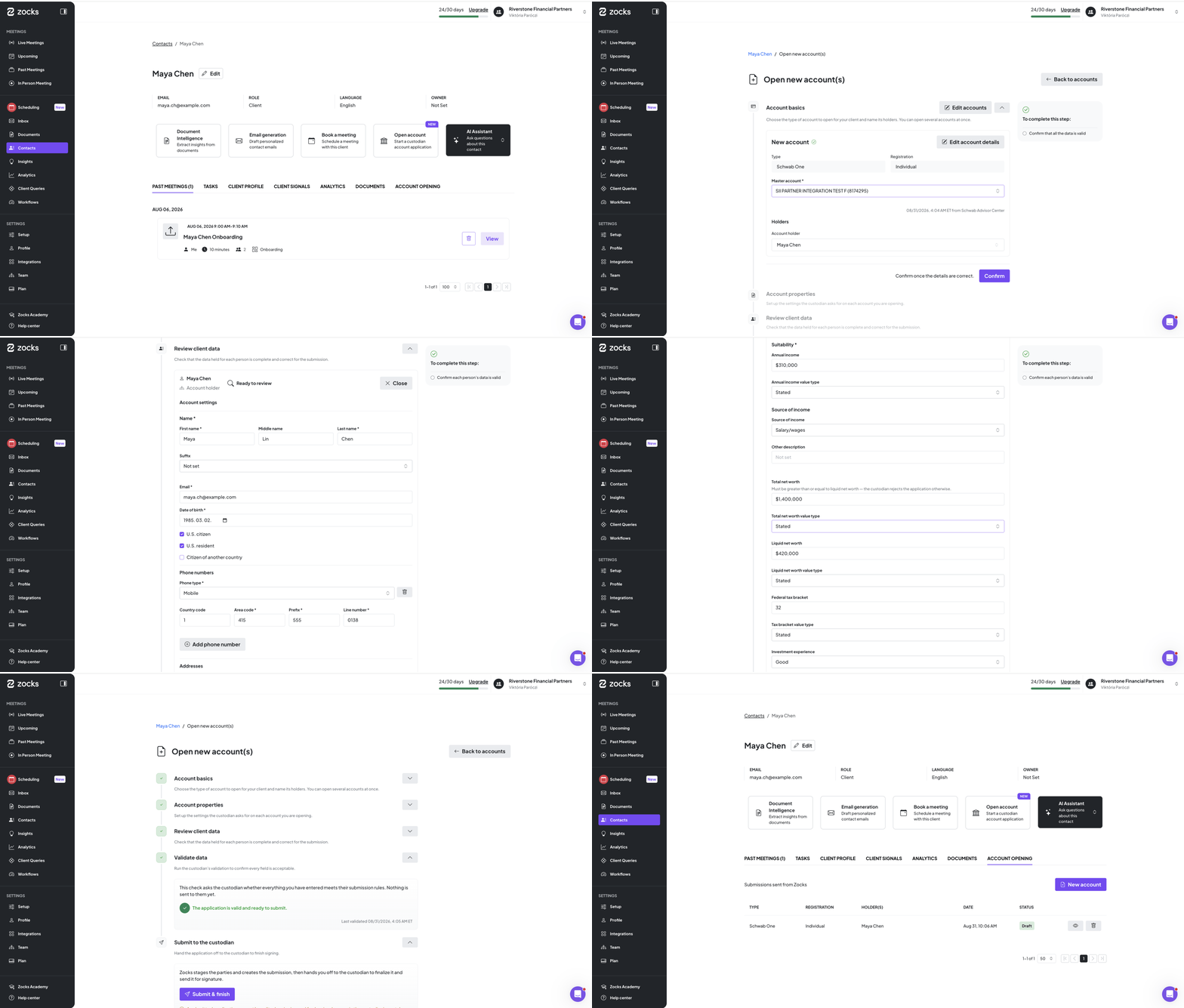
In early release with a small group of pilot firms. See it in action in the next session of our AI in Practice webinar series – save your spot here.
Update Any CRM Record from a Meeting
Opportunities, cases, service requests, and the custom objects your firm runs on — updated the same way you update contacts today, so every record around a client stays current.
The field-level updates that keep your contacts accurate now reach every record around them. What you discuss in a meeting is captured against the records it affects — an open opportunity, a service request, a review — and waiting for you afterwards, so nothing has to be re-entered.
Which objects and fields Zocks updates can be configured to match how your firm actually works. From there you choose the record, review what changed, and confirm. If no record exists, Zocks offers to create one. Available for Salesforce and all Salesforce-based platforms.
Available from the Professional plan. To get set up, contact your Implementation Manager, Account Manager or support@zocks.io.

Zoom Phone Integration
Zocks now supports Zoom Phone calls, automatically generating the same summaries and follow-ups you get from virtual and in-person meetings.
Zoom captures the call, while Zocks receives the call data, transcribes it, and processes it. Because of this, call capture needs to be enabled in your Zoom Admin settings.
Connect Zoom (or re-authorize it if you already use it) and enable call capture in Zoom Admin. Once the call ends, Zocks processes it and matches it to an existing meeting or creates a new record.
Setup steps: Zoom Phone Integration help article
Available on all plans.
Scheduling: Proactive Automated Reminders, Consent at Booking, Canceled Bookings Tracking
Three updates that move more of the scheduling work off your plate and onto the booking page.
Automated email reminders
Zocks now reminds clients about upcoming meetings for you, so fewer bookings fall through the cracks. Follow-up reminders go to clients who received a booking invite but haven't picked a time yet, and stop as soon as they book. Meeting reminders go out ahead of a booked meeting so it doesn't get forgotten. Only the client receives these, your co-advisors and other invitees don't.
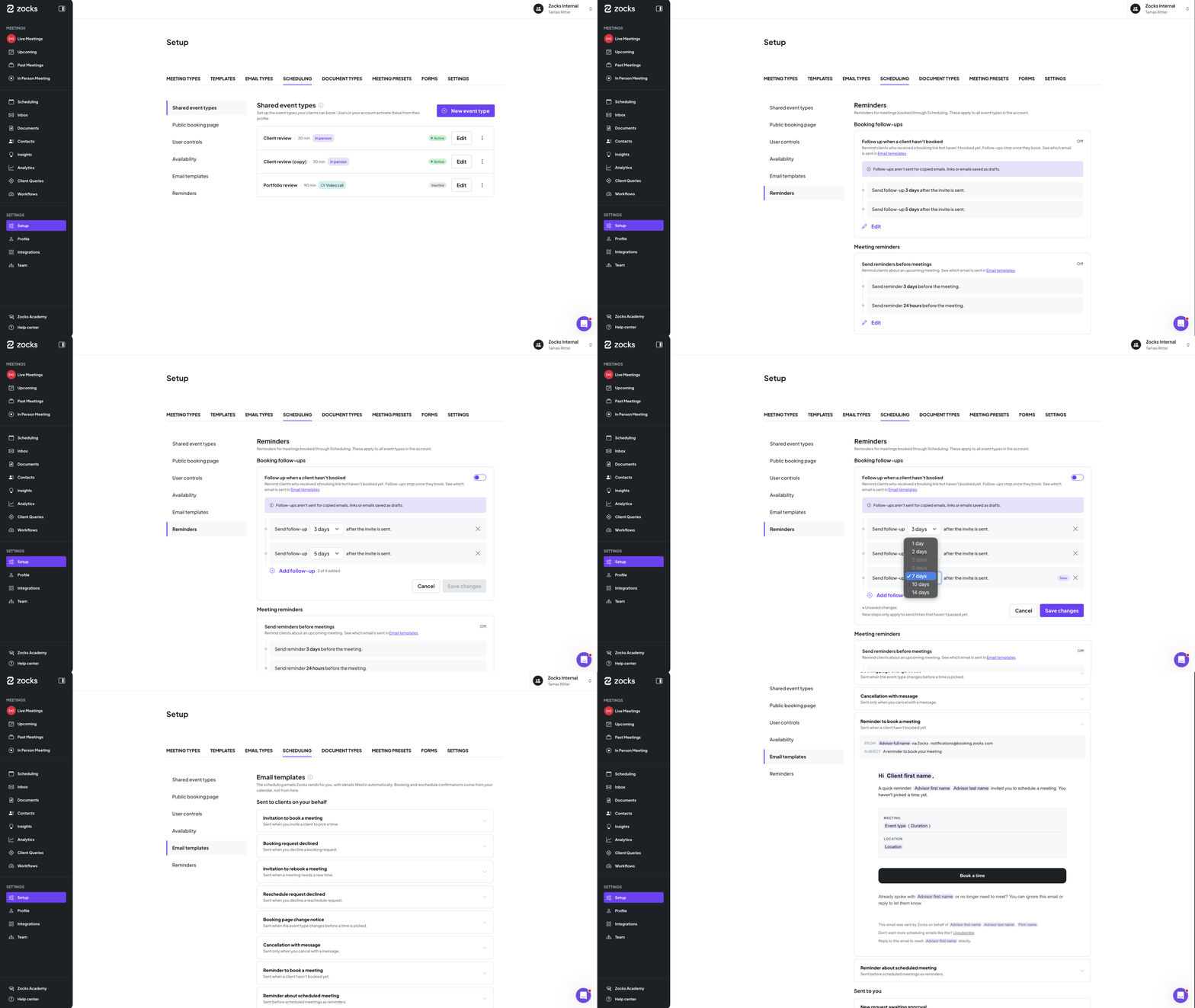
Reminders are off by default and turned on at the account level. You can set up to four per type and customize their exact timing. Any change you make applies to all reminders already scheduled but not yet sent.
Consent captured during booking
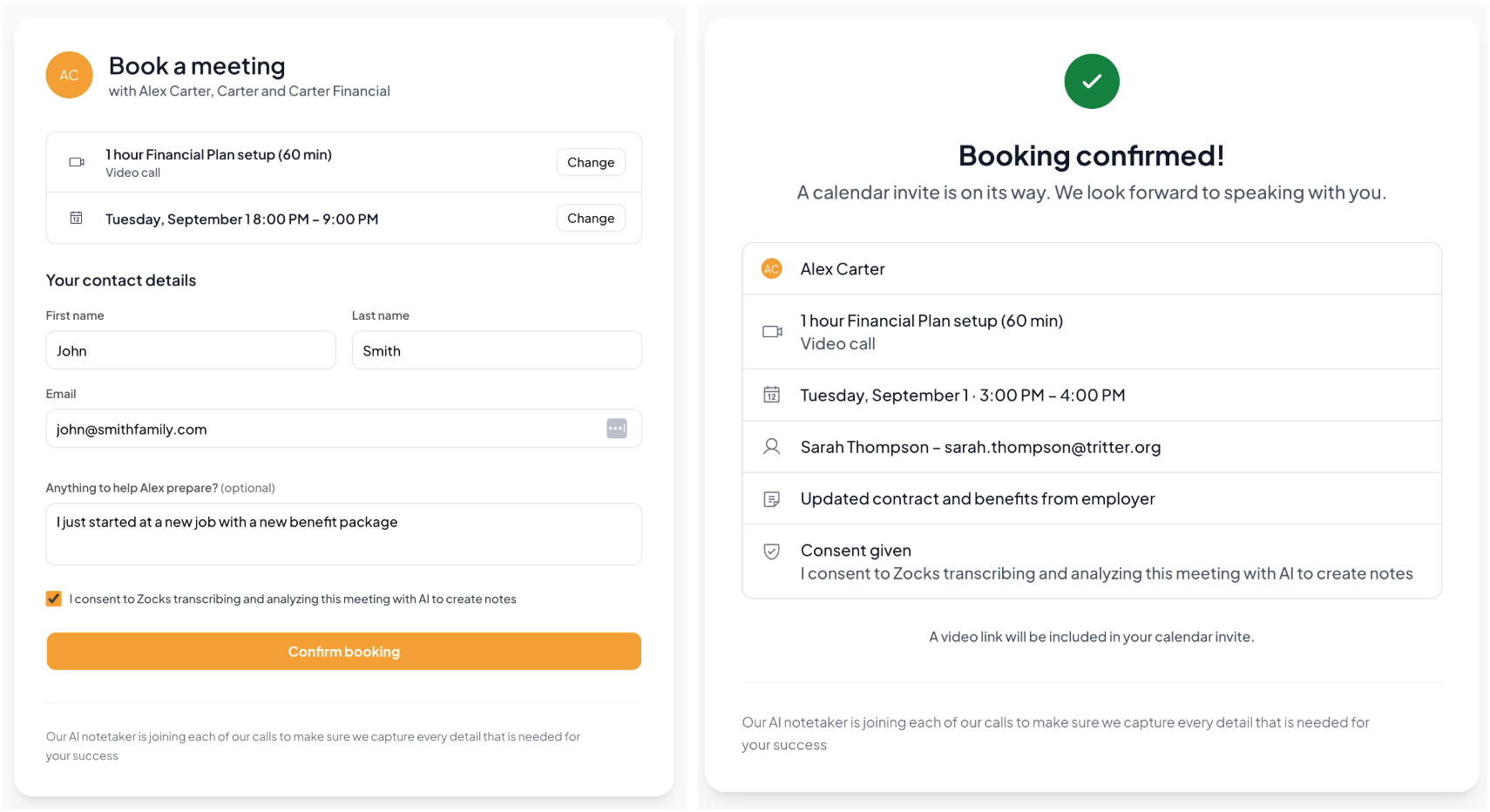
Consent collection now happens on your booking pages, so it's handled before the meeting starts and you can focus on the conversation from minute one. With consent tracking enabled at the account level, add a checkbox to your booking page and consent is captured as part of booking. It respects your configured meeting and contact-level consent settings, and automatically creates an entry in the contact's consent history.
Canceled and History tabs
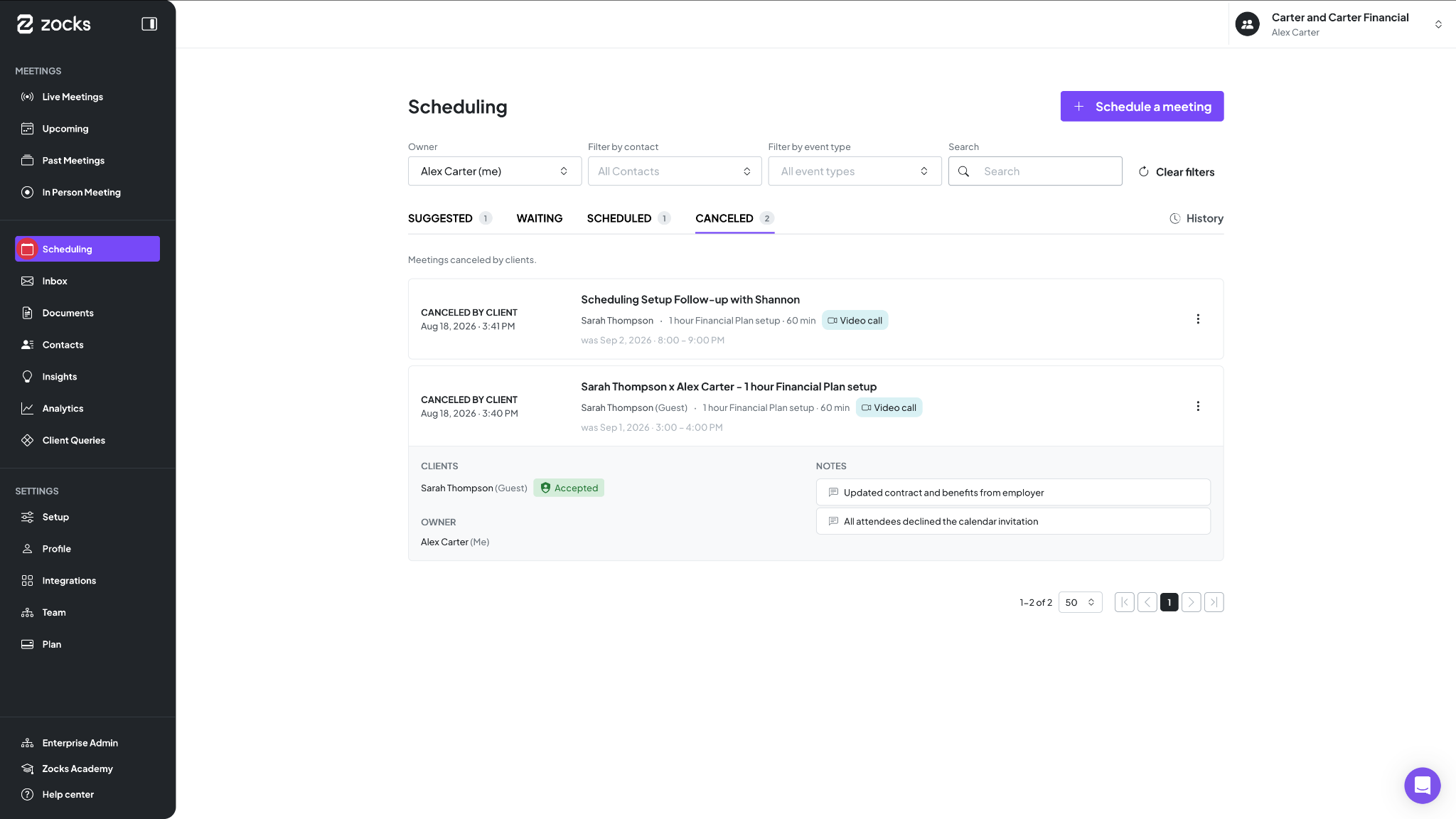
Two new tabs give you a clearer picture of what's happened around your bookings. Canceled shows meetings your clients called off, with a dedicated workflow for rebooking canceled meetings coming soon. History gives you a full activity log, just click any entry for the details, including the cancellation reason.
Available for Ultimate accounts.
Document Intelligence: Processed Documents in Meeting Prep, Attachment surfacing on the Documents page
Recent client files surfaced where you need them — before the meeting, and as they arrive.
Documents tab in Meeting Prep
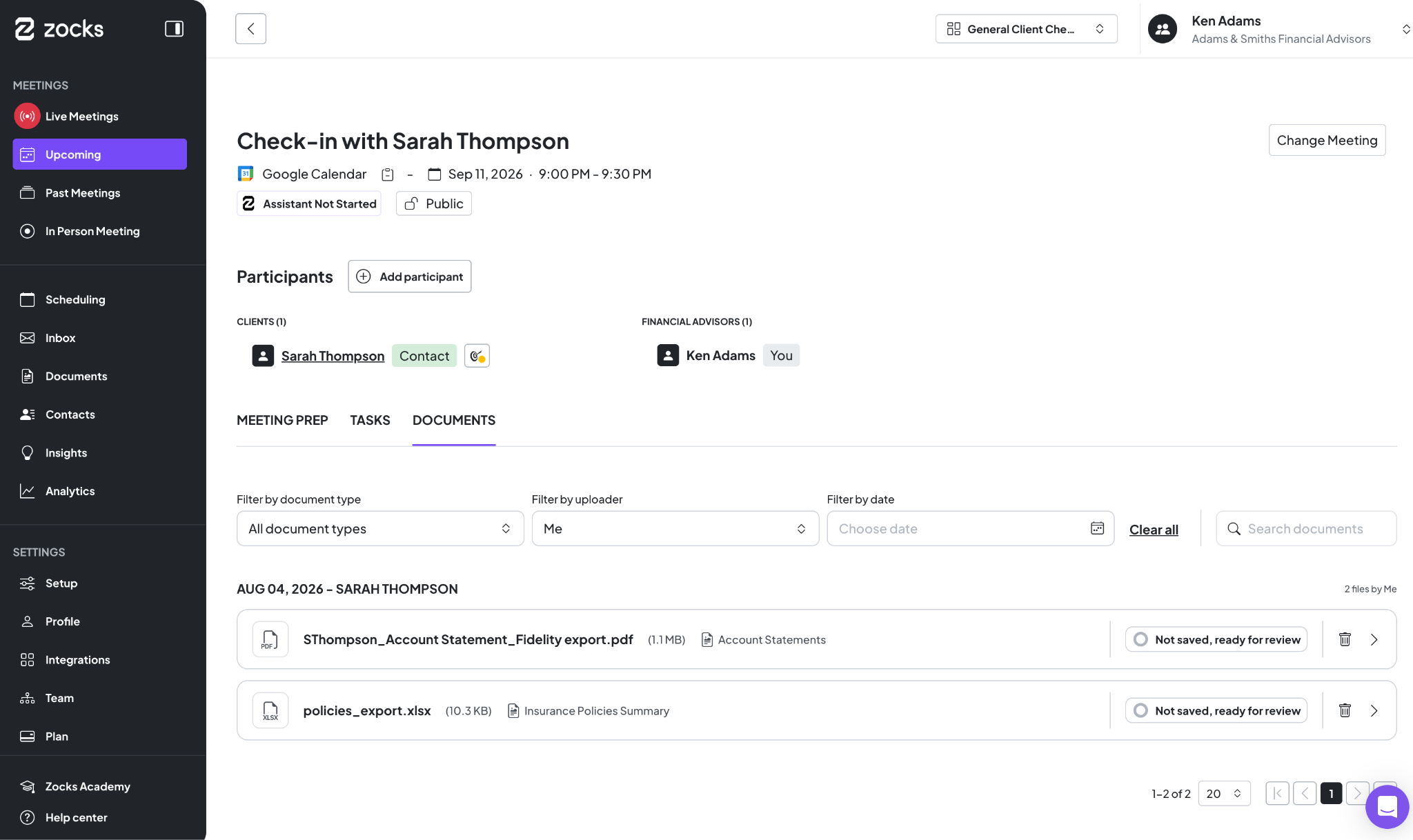
Meeting Prep now includes a Documents tab that surfaces recent documents uploaded for the clients in your upcoming meeting. No more hunting through history, the files relevant to your prep are right there alongside your other meeting context.
Attachment surfacing on the Documents page
Processing attachments via the Inbox or Outlook is already standard, and we're making that workflow more intuitive. Document Intelligence now proactively surfaces recent files from your contacts, so you can identify and handle important attachments immediately. No more digging — just a seamless extraction of data from the latest documents your clients have provided.
Available for Ultimate accounts.
Detailed Time Saving Report
Alongside team-level numbers, you can now see exactly how much time each user saves with Zocks.
Track individual time savings across:
- Meeting Prep
- Meeting Summary
- Ask Anything
- Additional workflows
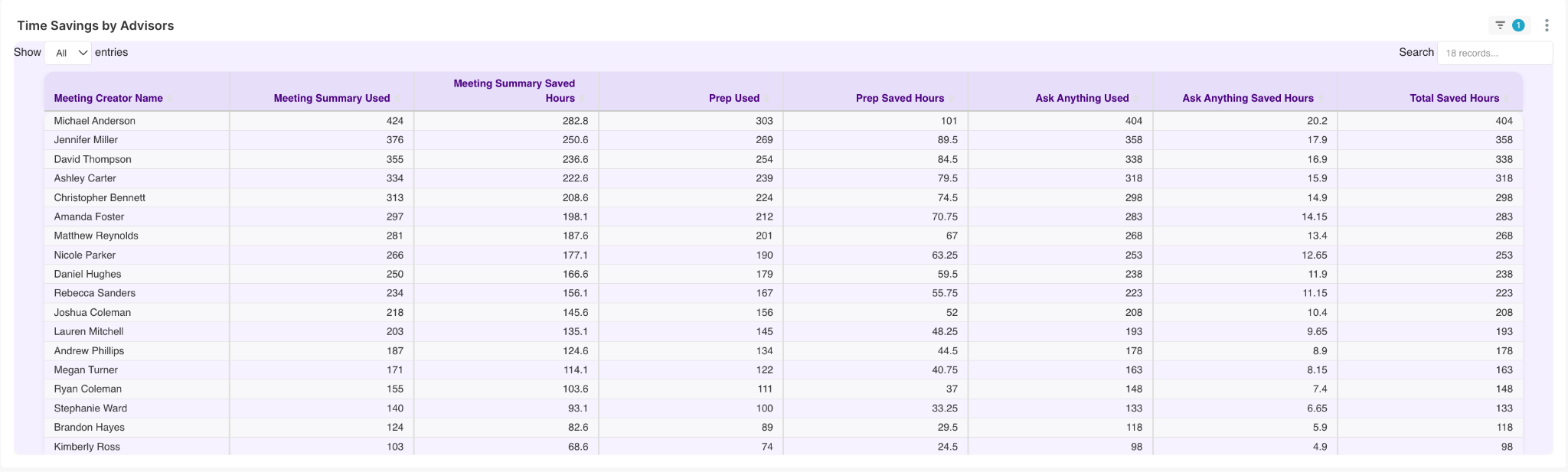
It's a clearer view of the impact Zocks makes, one user at a time. Visible on the “Time Savings” tab within Analytics.
Available for Professional & Ultimate accounts.
Related blogs
.avif)
.avif)
Get started for free in less than 10 minutes