.svg)

April 2026 Product Update
Client Signals in CRM, consent management & more - see what's new in Zocks!

We're back with the April product update. With this release, Client Signals can now flow directly into CRM. You can automatically save life and business events your clients share in meetings to your CRM records. We're also introducing granular Consent Management, giving firms full control over how client consent is captured and tracked.
Major additions and key updates for April:
- Automate your CRM workflows with Client Signals
- Redtail Activity Types & Task Templates for post-meeting workflows
- Consent Workflows That Match How Your Firm Operates
- RingCentral Calls: Add the AI Assistant With a Single Tap
- Meeting Types Built for the Full Client Lifecycle
- Match calendar events from additional email addresses
- New trackable user actions for compliance
Client Signals Now Flow Directly Into CRM
Automate your workflows - every life and business event detected in a meeting or email is instantly saved to your CRM.
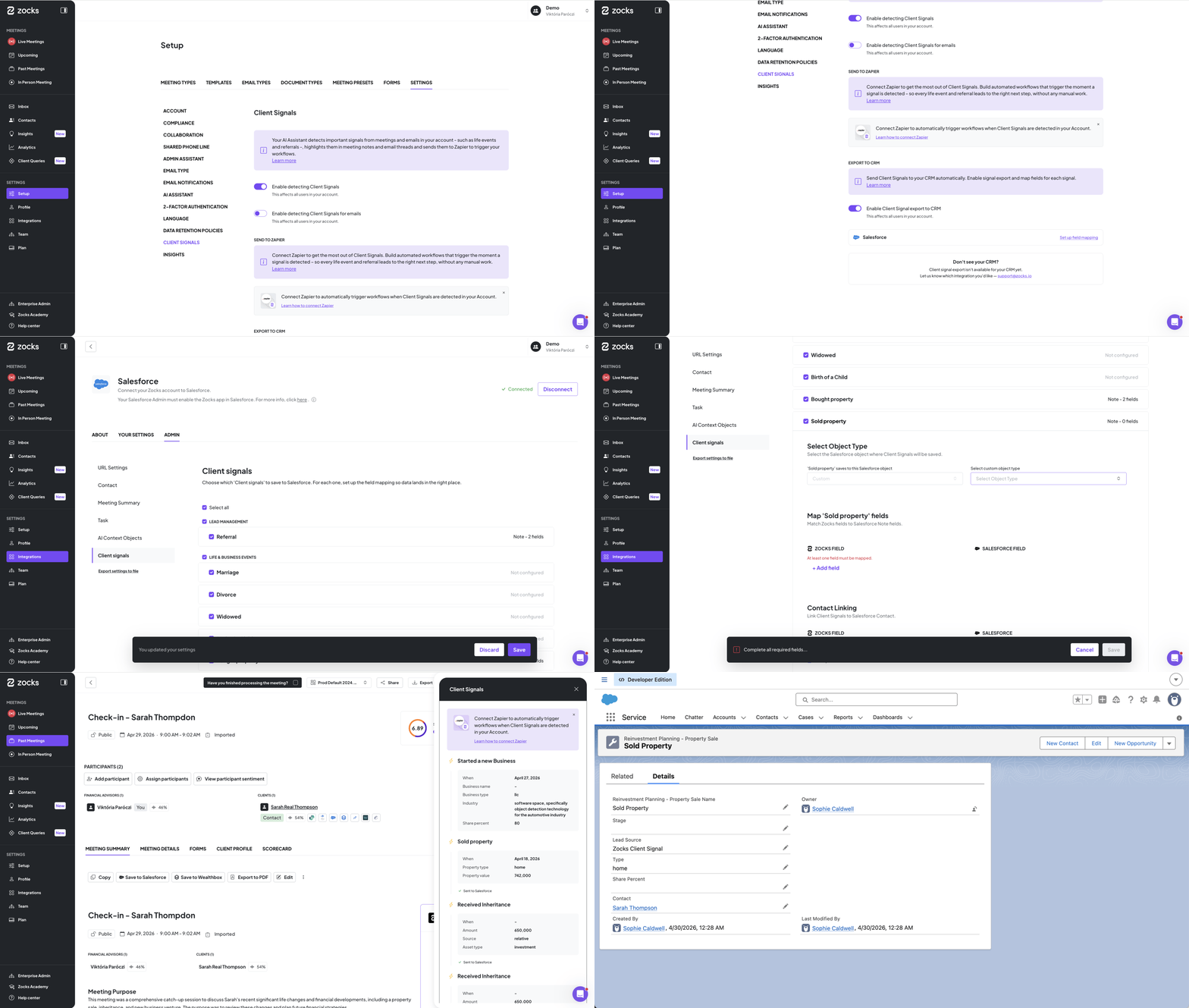
Zocks has already captured Client Signals and surfaced them for advisors to act on. Now those signals go one step further: they flow directly into the right CRM fields the moment a meeting or email is processed.
From property sales and business updates to family milestones, every relevant signal lands exactly where it belongs. Field mapping only needs to be configured once, giving your firm full control over where each signal goes and how it connects to your existing CRM workflows.
For firms that rely on CRM-based triggers to initiate follow-up sequences, compliance tasks, or team notifications — this means those workflows fire automatically, every time, without depending on advisors to manually log an event first.
What's included:
- One-time field mapping setup with full control over how signals connect to your CRM
- CRM-based automation workflows trigger automatically once a signal is saved
- Keeps client records accurate and up to date with no effort from advisors
Available on Professional and Ultimate plans. Your Implementation Manager can help you get set up - reach out at support@zocks.io. See the Help Center for details.
Redtail Enhancements: Activity Types and Templates
Keep your Redtail tasks structured and consistent with Activity Types and Templates.
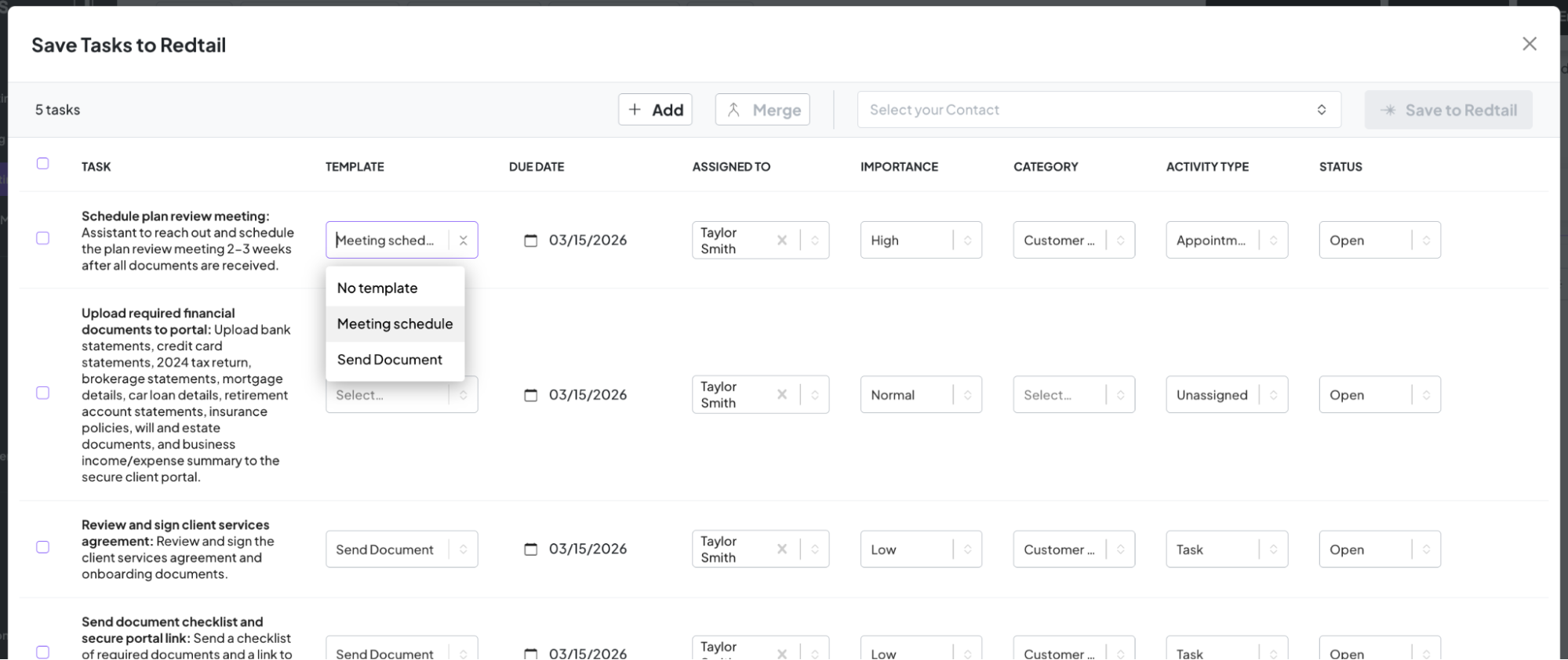
When syncing tasks to Redtail, you can now assign an Activity Type to each task, bringing Redtail's categorization structure directly into the Zocks workflow. You can apply your pre-built Redtail task templates when pushing AI-generated tasks, so your firm's activity formats are applied automatically.
The result: faster follow-ups and consistent structure, every time.
Available for all Redtail users. See the Help Center for setup details.
Firm-Level Control Over How Client Consent Is Captured
Tailor your entire consent workflow to your compliance model.
Building on our already advanced consent tracking system, the engine has been significantly expanded based on continuous user feedback, enhancing how consent is captured, tracked, and enforced in Zocks. Firms can now configure the workflow to model exactly how they operate.
What’s new:
- Full consent history at the contact level
- Optional evidence attachments and comments alongside every consent update
- Two enforcement models: client-level consent that applies across all meetings, or per-meeting consent that requires confirmation each time
- When a meeting is locked due to missing consent, it can be unlocked at the meeting level or by setting consent at the contact level
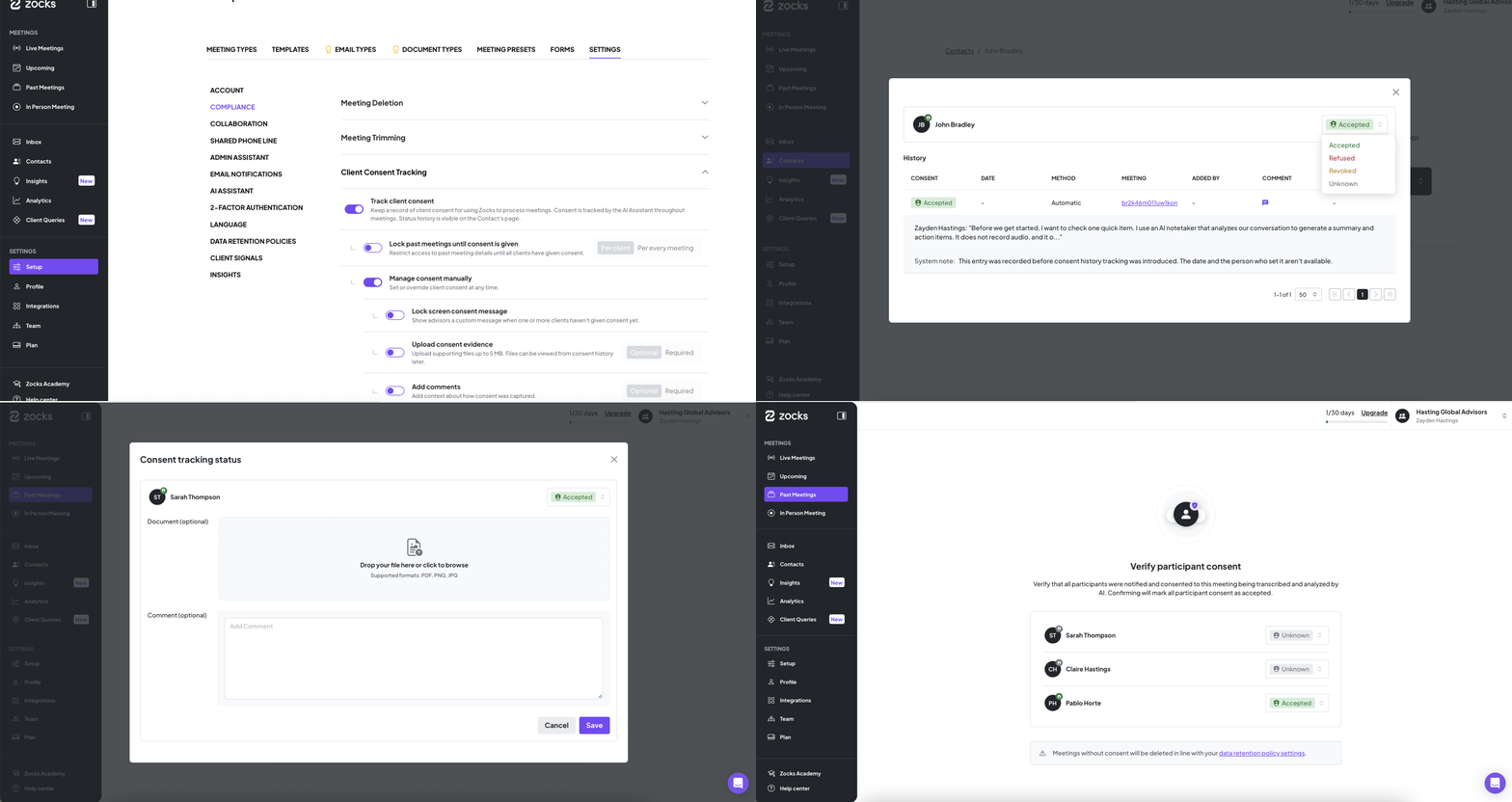
Advanced consent configuration and compliance controls are available on Professional and Ultimate plans. See the Help Center for setup and enforcement options.
RingCentral Calls: Add the AI Assistant With a Single Tap
Bring Zocks into every RingCentral call with a single tap.
Once your RingCentral account is connected, joining the Zocks AI Assistant to a live call is a single-tap action. Merge the call and the Assistant joins, captures the conversation, and routes it into Zocks. Works for both inbound and outbound calls.
Calls land as a new "RingCentral" phone meeting type and flow through your existing meeting types, templates, and presets. Meeting prep, meeting summaries, and follow-ups work exactly like they do for your other meetings.
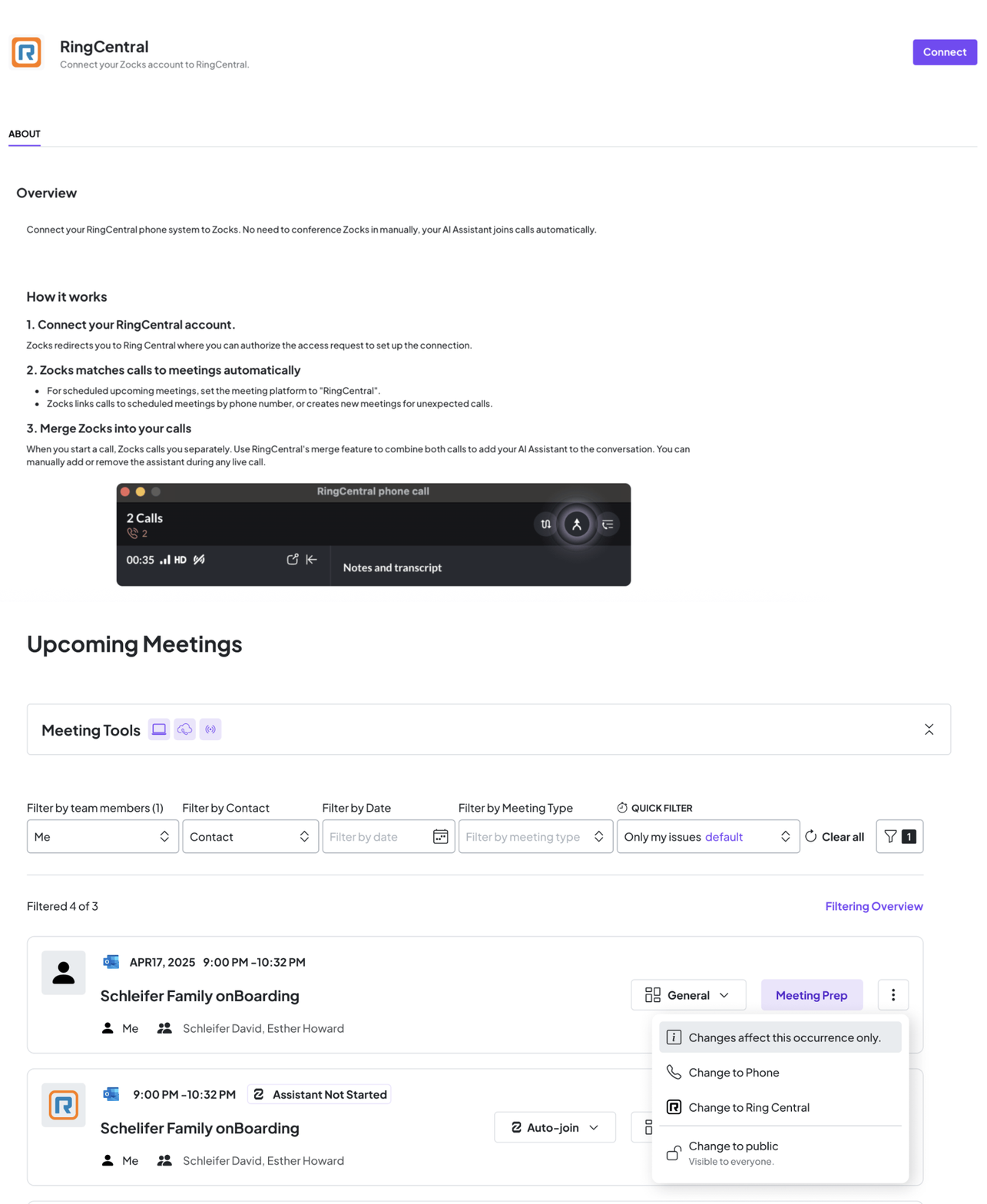
Available for all RingCentral users. Connect RingCentral from your integration settings to turn it on.
New Meeting Types: Better-Structured Summaries
This update applies to accounts created before January 2026 - newer accounts already have the updated defaults.
Get prep, agendas, and summaries tuned to the specific kind of conversation you’re having instead of one generic template covering everything.
We've reworked the default meeting types to better match how advisors work across the client lifecycle. Three defaults have been updated and four new types have been added:
Updated: Client Meeting → General Client Check-In (new default); Plan Review → Plan Proposal; General Meeting → Internal Meeting
New: Discovery Meeting, Insurance Discovery Meeting, Client Review, Client Intake
The update is opt-in, and your existing meeting types keep working unchanged. To switch, head to Settings → Meeting Types. If you've customized your current types, back up your agenda and scorecard before updating.
Full details are in the Help Center article.
Linked Emails: Match Meetings Across Multiple Calendars Automatically
Manage invites across more than one inbox - without a second calendar connection.
Connect up to two additional email addresses to your Zocks account. From then on, any calendar invite sent to assistant@invite.zocks.io from one of those addresses is processed automatically, the same way it would be from your primary connected calendar. No missed meetings, no duplicate accounts.
Each email address can only be linked to one Zocks user, so shared aliases need to be assigned to a single owner.
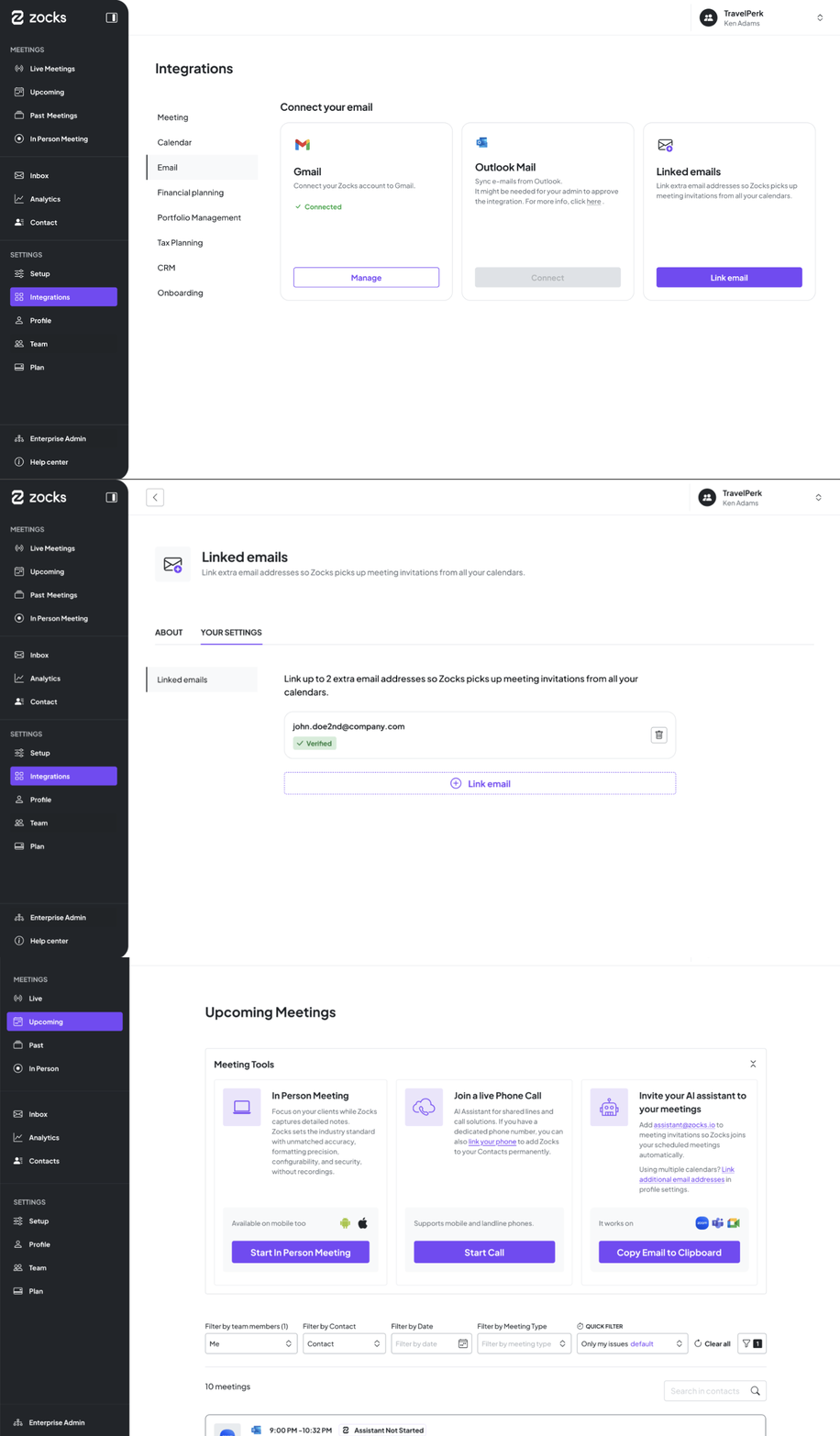
Available on Professional and Ultimate plans. Add your additional addresses from your account settings to start using it. See the Help Center for more setup details.
Audit Log Enhancements: More User Actions Now Trackable for Compliance Teams
Track exactly what’s happening across your Zocks account - with a clear, tamper-evident record for compliance reviews and internal oversight.
This month, we've significantly expanded what you (as an Owner or Admin) can track:
- Authentication and access: Logins, login methods, MFA changes, password resets, user invites, deactivations, and contact record changes
- Integrations: MCP apps enabled or disabled, connections revoked, and permissions changed
- Consent management: Full record of consent activity - including when consents are created, updated, or deleted, and when attachments, reasons, or consent types change
- Linked emails: Track when new email integrations are added to the account
Whether you're preparing for a compliance review or need to know exactly what's changed and when, Audit Logs give you the full picture.
Available on Professional and Ultimate plans.
Related blogs
.avif)
Get started for free in less than 10 minutes